Epson PP-100, PP-100N, PP-100AP Adjustment Program New!

$29.99
Epson <b>PP-100, PP-100N, PP-100AP </b> Adjustment Program  <font color=red>New!</font>
   Click to enlarge
      

Epson PP-100, PP-100N, PP-100AP Adjustment Program

This adjustment program is developed for making PP-100 Disc Producer adjustments and maintenance
PP-100, PP-100N, PP-100AP Adjustment Program Version 3.03, Issue Date : October 25, 2010
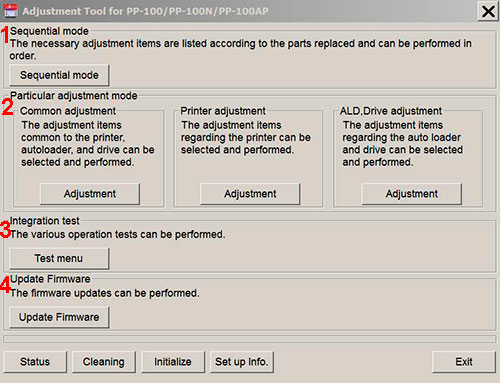
Adjustment program for Epson PP-100, PP-100N, PP-100AP Disc Produces has 4 main sections:

1. Sequential mode includes necessary adjustment items according to the parts replaced and can be performed in order

2. Particular adjustment mode includes 3 parts:
- Common adjustments - adjustments common to the printer, autoloader and drive.
- Printer adjustments - adjustments items regarding the printer.
- ALD, Drive adjustments - adjustments items regarding auto loader and drive.

3. Integration test - various operation tests can be performed in this section.

4. Update Firmware - the firmware updates can be performed in this section.

This adjustment program DOESN'T HAVE such functions as Waste Ink Counters Reset


If You need Waste Ink Counters reset - please use the WIC Reset Utility - Download here
Epson PP-100, PP-100N, PP-100AP Adjustment Program can be used under Windows only (Millenium, 2000, XP, 7, 8, 10 Vista [in compatibility mode]).

To get this adjustment program, for the Epson PP-100, PP-100N, PP-100AP you need to do the following:

  1. Purchase the utility from 2manuals.com.
  2. You'll get download link on-line and in the email message too
Before You will use Adjustment Program we recomend You reading Service Manuals:
Epson PP-100 Service Manual
Epson PP-100AP Service Manual
Epson PP-100N Service Manual

If You want to pay by PayPal - Go Here to pay by PayPal

You can download Free DEMO version first. This DEMO PP-100, PP-100N, PP-100AP Adjustment Program is developed special for our customers. You can download it and use - Free. You can see all available adjustment functions in Original PP-100, PP-100N, PP-100AP Adjustment program and be sure before purchasing this Adjustment program.

Download Epson PP-100, PP-100N, PP-100AP DEMO Adjustment Program Free - Download Free

Video Tutorial how to work with DEMO Epson PP-100, PP-100N, PP-100AP Adjustemnt Program:


Please contact us if you have not received your order.

We don't supply Free Epson PP-50, PP-50BD, PP-100, PP-100N, PP-100AP, PP-100II Resetter

I want to:

Any questions about this product?

SEND US REQUEST by filling the form below.


Step 1
ADD TO CART
Step 2
CHECKOUT
Select payment method.
Step 3
Confirm the order.


We are in business since 2002 and do our best to give our customers perfect service!

  Michael Eckenberger 2020-07-01 13:43:36  
  This was super helpful, thank you! I used the trial key this time to be sure it worked, but will be more than happy to purchase the service when I need it next :)
  latonna roberson 2019-04-03 18:41:10  
  My Epson 1400 got the end of life message and I had already reset it once before so I couldn't use the Epson site to reset it. I remembered this site from years ago and purchased the utility reset and it worked like a charm. Only wish I had not spent $400 on a new printer before remembering your site. Anyways I just did a live video showing that this really works on my youtube channel. More people need to know about this remedy!
  Mark Wainwright 2022-11-15 18:03:40  
  Very impressed! After a fruitless search for official Epson support for the Waste Ink error I found a YouTube video showing how to remove and clean the ink pads but still needed to reset the counter. After some initial "Is this unofficial 3rd Party Solution a scam?" trepidation I took a chance on the WIC reset tool and now, about half an hour (mainly spent drinking tea and waiting for the key to be emailed) and 6 quid later I have a fully functioning XP-342. In the meantime, Epson UK responded to a message I sent them on Twitter, telling me that I could send the printer away to their service centre for an unspecified period of time and pay them £48 to have the ink pads changed and the counter reset. All with a caveat that having "tampered" with the ink pads myself, the service centre might refuse to fix the printer. Thanks for a great piece of kit which has saved me a lot of time, effort and money.
  Navin Moodley 2025-05-15 20:37:26  
  HI this worked perfect for my Canon MB2140 Thank you South Africa
  WILSON ALVARADO 2012-11-28 23:44:16  
  EPSON TX133 KEY PARA RESET DE PRINT URGENTE, PARA ASI PODER TRABAJAR Y BRINDAR SERVICIOS A MIS CLIENTES
  giuseppe moffa 2020-06-10 15:13:35  
  after only cleaning the printer (Canon G3400) three times in a short period, the waste counter was on 100% (almost new printer). tried the free tools which you can download to reset the counter, they all didn't work. Finally decided to buy the key here and didn't believe it would work. But it did, i can use my printer again and I am happy.
  mikel baculio 2007-12-26 21:35:51  
  this site is very good to the technicains of epson r230
  Daniel Nove 2010-11-11 09:33:24  
  Excellent. Very well invested 10$ CX9300F , worked like a charm. Thanks guys
Write review





