Epson WorkForce WP-4532, WP-4592 (Latin) Ver.1.0.3 Service Adjustment Program New!

$19.99
Epson <b>WorkForce WP-4532, WP-4592</b> (Latin) Ver.1.0.3 Service Adjustment Program  <font color=red>New!</font>
   Click to enlarge
      

Epson WorkForce WP-4532, WP-4592 (Latin) Ver.1.0.3

This adjustment program is developed for making printers adjustments and maintenance such as:

Adjustment
- EEPROM Data Copy
- Initial Setting
- Initialize PF / EJ deterioration offset
- Initialize PW sensor deterioration counter
- PE detector confirmation
- Head ID input
- Head angular adjustment
- Bi-D adjustment
- Paper Skew Adjustment
- PW / First dot position adjustment
- PE adjustment
- PF/EJ band adjustment
- PF band adjustment
- CR motor heat protection control
- PF motor heat protection control

Maintenance
- Head cleaning
- Ink charge
- Ink Pressure Release
- Maintenance counter
- Shipping setting
- Compulsion Uni-D function ON/OFF
- Final check pattern print
- EEPROM dump
- Printer information check
- Paper feed test

This adjustment program DOESN'T HAVE Waste Ink Counters Reset function. Read only.
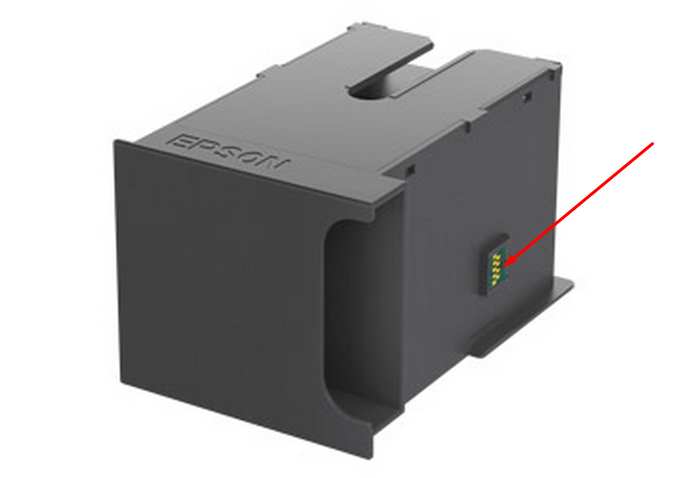
This printer models have separate maintenance cartridge with IC chip that can be reset by hardware chip resetter. No one software can reset chip on maintenance waste ink cartridge in this models.


The Epson Adjustment Program for New models Epson WorkForce WP-4532, WP-4592 can be used under Windows only (Millenium, 2000, XP, Vista, 7, 8, 10 [in compatibility mode]).

To get this adjustment program, for the Epson WorkForce WP-4532, WP-4592 you need to do the following:

  1. Purchase the utility from 2manuals.com.
  2. You'll get download link on-line and in the email message too
We recommend reading the Epson WorkForce WP-4532, WP-4592 Service Manual before using the adjustment utility.

This printer models have separate Waste Ink Maintenance Box with its own IC chip. You can replace Waste Ink Maintenance Box or reset the chip on the Waste Ink Maintenance Box. Read more about how to reset the Waste Ink Maintenance Box.
Please contact us if you have not received your order.

I want to:

Any questions about this product?

SEND US REQUEST by filling the form below.


Step 1
ADD TO CART
Step 2
CHECKOUT
Select payment method.
Step 3
Confirm the order.


We are in business since 2002 and do our best to give our customers perfect service!

  Rod Marquardt 2012-11-16 22:37:12  
  I was very pleased with your company and would recomend to everyone. Very easy!
  Jack Vikati 2025-03-17 02:23:07  
  Reset key itself WORKS, hurrah! 5 stars. BUT . . . it was a struggle to get the download. Our MacBook which is a few years old does not allow the download to be installed because Apple blocks "unrecognized developers." That should be taken care of or a warning should be placed on all promotional materials related to WIC RESET KEY. I was able to get the download onto my old Apple desktop which has not had operating system updates. That's how I finally purchased the reset key. Please tell me why the whole business of the reset key, after replacing the ink pads, is not an example of contrived malicious obsolescence? I was tied up for hours, cursing the Epson company, and a breath away from buying a new printer, adding plastic waste into our environment. I liken my experience to changing a car's oil filter and then needing a code to start the car again.
  Bill Schumacher 2013-02-22 05:48:12  
  I have a Epson TX700w printer I contacted epson in Australia for a fix for full ink pads. They were about as much help as an ash tray on a harley. I pulled the pads out joined a hose to the ink drain hose drilled a small hole in the case put the hose through to a bottle on the out side ink pad problem solved. Downloaded the WIC Reset Programe Reset counter job done. The printer is working like a new one. I will never buy another Epson product again. A big thankyou to the Wic Programe you have saved me a lot of money. Bill.
  Gerd Fremgens 2013-08-24 10:25:05  
  Great, for me absolutely great and excellent ! At my first email contact with 2manuals.com I received a fast response to a question about my printer and then I've been spend ~20 $ for the RX420 Printer manual and one RESET- Key , and it works :-) The Printer manual even is absolutely recommend for Technic freaks , escpecially the pictures in the 'disassembly/assembly' --_ section 4.3.10 Waste Ink Pads are useful. Many thanks and regards, Gerd
  Richard Chilton 2020-07-29 19:53:42  
  My Epson XP-800 max'd out on counters and died on me. Screen of death with printer disabled by manufacturers internal firmware. Researched the web and found these guys. The reset process and key purchase was easy to follow and after a few registration steps and a simple paypal transaction the reset key arrived, was entered and the printer was back working again. Saved me at least £80 on a new basic 3-in-1 printer plus ensured my existing ink supplies were not useless Thanks guys - thoroughly recommended
  mohammed kateeb 2006-01-02 01:40:38  
  i just wnna thank u for ur gret websit becoz its so easy and shortly . by other wise i need u to info me about service manual if it has trouble codes and diagnostic and troubleshooting procedures ?......thanx
  Tim Plumley 2011-12-03 20:31:01  
  I own an Epson Artisan 700- Prior to buying it I never heard of the issue with the waste ink counter and epson's built in error codes that render the printer useless after reaching a certain print count. I like a lot of you searched for fixes online. I happened upon (2manuals.com) by way of youtube. I was very reluctant about using this but I also didn't have many other alternatives short of giving in to Epson and their repair method and cost or the purchase of another printer. I am very pleased that I went this route because my printer is up and going (printing) like it should be. I am a very satisfied customer. Thanks, Tim P.
  Timothy Johnson 2025-05-01 04:00:40  
  I am so sorry for the bad review 8 gave. I jumped on too soon. I totally retract all of my statements. The key worked perfect. It was totally worth it. I will use this service again when needed. Again I am really, really sorry.
Write review
Shopping Cart more
Shopping Cart is empty


How to pay?
We accept
Credit Cards, PayPal
and Western Union payments


We accept M-Pesa
Pay By M-Pesa
How to Pay by M-Pesa


Buy here or find Resellers in your country:

Argentina

Pay in Argentina Peso

Algeria

EasyPrint-dz.com

Australia

Mir-Aus.com.au

Bangladesh

Pay in Bangladesh by BDT

Brasil

Pay in Brasilian Reals
ReseteadoresWIC
Brasil

Burundi

PrintersAfrica.com

China

Pay in Chineese Yuan

Cote D Ivoire

MonpcImprime.com

Columbia

Pay in Columbian Peso
ReseteadoresWIC

Dominicana

Rellenadodecartuchos.com

DR Congo

Buy in DR Congo

Ecuador

ReseteadoresWIC

Ethiopia

PrintersAfrica.com

France

InkCissPrinter

Ghana

Pay in Ghana Cedis

Germany

InkCissPrinter.com

Japan

Pay in Japaneese Yen

Iran

MahaShop.ir
FixPrinters.ir

Iraq

AlmohandsWorkshop

Indonezia

Pay in Indonesian Rupiahs
FastPrint.co.id

Italia

Inkspeed.it
Stampacontinua.it

Kenya

PrintersAfrica.com
MagiColors.biz

New Zealand

Mir-Aus.com.au

Philippines

Pay in Philippine Peso

Poland

Tusze.info
Progbit.pl
ResetPampersa.pl
ResetWIC.pl

Portugal

Printsemfim.com
InkCissPrinter.com

Romania

CissMarket.ro
Cartuseria.ro
AmDigital.ro

Rwanda

PrintersAfrica.com
Ciss-Solutions.com

Saudi Arabia

Alelm-Alamal.com

Soomaaliya

PrintersAfrica.com

South Sudan

PrintersAfrica.com

Spain

InkCissPrintert.com

Tanzania

PrintersAfrica.com

Turkiye

Cescesor.com

Uganda

PrintersAfrica.com

Vietnam

WIC.vn
ResetKey.net
Want to sell Reset Keys in Your country?
Notifications more
NotificationsNotify me of updates to Epson WorkForce WP-4532, WP-4592 (Latin) Ver.1.0.3 Service Adjustment Program New!





