Epson WorkForce Pro WF-C5210, WF-C5290, WF-C5710, WF-C5790 Adjustment Program for printhead unclogging, printer adjustments and maintenance for ONE PC unlimited.
This Epson WorkForce Pro WF-C5210, WF-C5290, WF-C5710, WF-C5790 adjustment program can be used under Windows XP, 7, 8, 10
(or under higher versions [in Windows XP, 7 compatibility mode]) with USB connection only.
How to buy unlimited version for One PC:
1. Log In to Your 2Manuals account
2. Download HardWare ID Utility HWID.exe, run it and copy yours PC Hardware ID
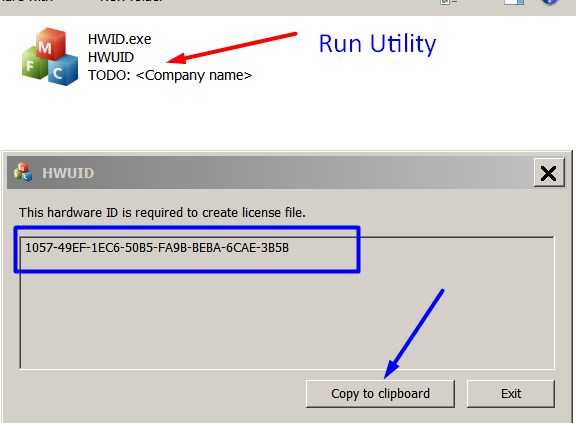
Note! You have to disable antivirus or put HWID.exe file to ignore list!
3. Put this item in to your shopping cart
4. Go to payment page and enter HardWare ID in to specified field:
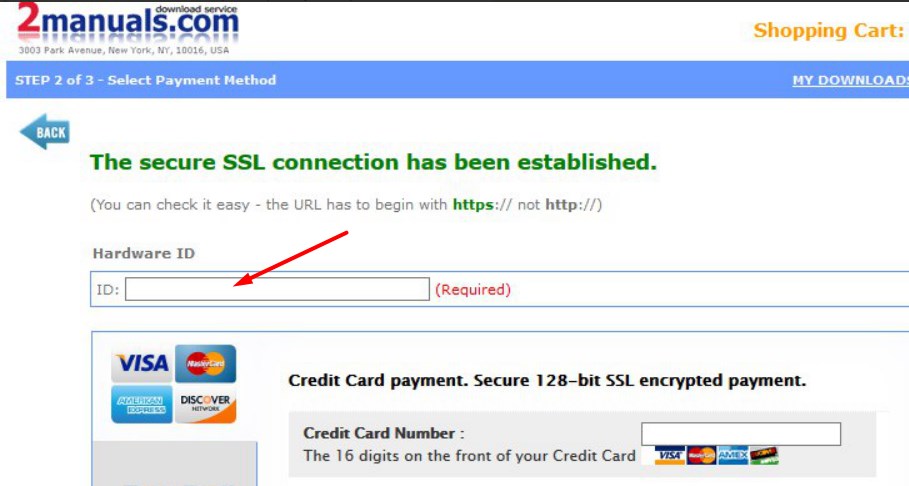
5. Make payment and You will get download link with Epson WF-C5210, WF-C5290, WF-C5710, WF-C5790 Adjustment Program with the License file included. Download ZIP Archive to your PC and extract files to the folder on Your PC.
6. Put WF-C5210, WF-C5290, WF-C5710, WF-C5790 Adjustment Program to Antivirus Ignore list or disable Antivirus. Then Run ServProg.exe.
If You want to pay by PayPal -
Go Here to pay by PayPal
With this EpsonWF-C5210, WF-C5290, WF-C5710, WF-C5790 Program You can make adjustment and maintenance procedures and Initial Ink Charge to clean and unclog printhead.
You can download Free DEMO version first. This DEMO Epson WF-C5210, WF-C5290, WF-C5710, WF-C5790 Adjustment Program is developed special for customers. Download it Free. You can see all available adjustment functions in Original WF-C5210, WF-C5290, WF-C5710, WF-C5790 Adjustment Program and be sure before purchasing the program.
Download Epson WF-C5210, WF-C5290, WF-C5710, WF-C5790 DEMO Adjustment Program Free - Download Free
Video Tutorial how to work with DEMO Epson WF-C5210, WF-C5290, WF-C5710, WF-C5790 Adjustment Program:
To get this adjustment program, for the Epson WF-C5210, WF-C5290, WF-C5710, WF-C5790 you need to do the following:
- Download Epson WF-C5210, WF-C5290, WF-C5710, WF-C5790 Adjustment Program.
- Buy this item - License for ONE PC for Epson WF-C5210, WF-C5290, WF-C5710, WF-C5790 Adjustment Program. You'll be able to download License file immediately after your payment transaction is complete.
before using the adjustment utility.
Please contact us if you have not received your order.
|
|
|
|
|
Step 1
ADD TO CART |
Step 2
CHECKOUT
Select payment method. |
Step 3
Confirm the order. |
|
|
We are in business since 2002 and do our best to give our customers perfect service!
|
| borges bicolor | 2007-11-19 07:40:28 | |  | Mark LAYPORT | 2025-11-29 04:21:41 | | OK Im here because Youtube directed me here to fix my Epson ET-2803 printer! I've downloaded your APP and tried to use it! ...There are a number of problems!!! ...First off, couldn't you find any smaller text!!?? Trying to read and follow your directs is near impossible!
Next up, your directions aren't very clear! You direct me to turn on my printer then to turn it off. And as I try to move forward I click on your direction and NOTHING happens, until the command times out. BUT IF I turn off my printer again (un-directed by you) the command tried to go through. UNTIL I get more directions to turn on my printer and not turn it off again. I've seen a line at the bottom of the screen there a line of text floats through saying that the computer has been reset per the Youtube site I'm supposed to get a congratulations of a successful at the finish, I never get that, because my last command (theoretically) never goes through, again just sitting there until it times out again.
IF your really trying to "help" people PLEASE fix you site! Because nothing seems to work correctly, I'm hesitant to buy any keys from you.
...Sincerly, Mark L | | | toumi taher | 2011-03-31 21:16:54 | | salut ..... demande de deux key pour la reset countre imprimante epson p 50 | | | Fernando Fernando | 2008-03-08 09:09:51 | | waiting waiting waiting waiting | | | ricardo Gamad | 2015-07-28 13:46:54 | | Thank you so much, I was able to fix my printer L1300 successfully with your amazing software. | | | Robin Pruett | 2023-07-13 20:54:29 | | I was skeptical, like I'm sure we all are when buying something new online, but I simply turned off my Epson Monitor, under maintenance tab, bought the key, turned off my printer, then turned it back and and IT WORKED! Well worth $10.00, just so I don't have to buy another printer. | | | savalli Tiffany | 2023-03-30 14:48:51 | Je ne sait plus l'utiliser j'ai demander à en avoir une nouvelle mais je 'ai jamais eu de retour... donc pour moi application non fiable.
======reply======
Reset key is for ONE USE only
One reset key - One Reset
It is clearly stated in reset key description! | |
|





 Total customers: 432843
 Customers online: 301








