

Canon General Tool for iP1200, iP1600, iP2200 printers

$9.99
<b>Canon  General Tool</b> for iP1200, iP1600, iP2200 printers
   Click to enlarge
      

CANON PIXMA iP1200, iP1600, iP2200 General Tool
To reset waste ink pads counters you have to use iP1600 Service Tool:

1. Order and DOWNLOAD Service Tool for Canon iP1200, 1600, 2200
2. Unzip downloaded file by WinZip.
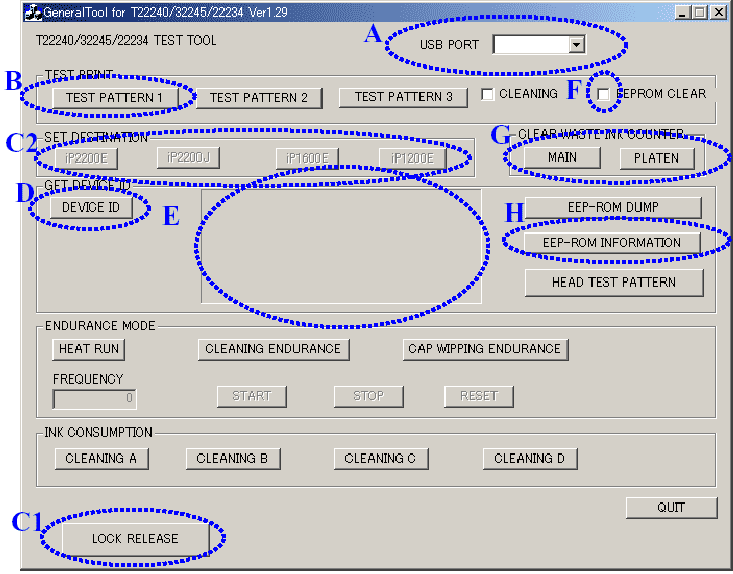
3. Run GeneralTool.exe file
4. Select the connected USB port number from USB PORT
5. Click LOCK RELEASE, and select the applicable model name in SET DESTINATION
6. In CLEAR WASTE INK COUNTER, select MAIN or PLATEN. The selected waste ink counter will be reset. MAIN resets the main waste ink counter, PLATEN resets the platen waste ink counter. If both the main and platen waste ink absorbers are replaced, reset both the main and platen waste ink counters.
iP1200, 1600, 2200 printers Service Tool

ZIP archive: 9 697 kB

I want to:

Any questions about this product?

SEND US REQUEST by filling the form below.


Step 1
ADD TO CART
Step 2
CHECKOUT
Select payment method.
Step 3
Confirm the order.


We are in business since 2002 and do our best to give our customers perfect service!

Our customers reviews:

  Vadimka Vadimka 2010-05-03 12:54:42  
  Спасибо. Все скачалось то что нужно!
  ed dy 2007-06-15 00:30:52  
  Canon service manual for iP1200, ip1600 worked out fine!!
  ary sasmita 2006-08-27 02:03:31  
  Worked fine!
  Heri Putra Kelana 2006-05-12 05:06:13  
  please confirmation canon ip1200,1600,2200 printer service tools.
  Giorgos Zaxarias 2006-09-26 00:32:15  
  It\'s ok! thank you......................................
  Dan McCue 2020-08-23 01:54:14  
  I replaced the waste ink pad assembly on my Epson XP-800, not understanding that there were internal counters needing to be reset. The WIC Reset Utility and the WIC RESET KEY, along with the replacement waste ink pad assembly, have restored my printer to me. Thanks for making it so easy and, most importantly, having it work like you said it would.
  sabir ali 2018-05-01 02:18:31  
  The procedure was easy. I used the trial version, and my printer is now working. I will buy the reset key next time. I recommend this fix. Thank you....
  Oliver Kaufmann 2024-11-07 18:46:09  
  download easy wonderfull tutorial videos connection via usb cable first try with "trial" -_ excellent final try with bought key will never buy an epson again...
  Rick Benavides 2011-06-07 22:14:16  
  Thanks John, You saved me alot of time and frustration dealing with that idiot I was talking with at Ebson, he didn't know sh$t about my printer, he began by telling me that my printer was like a human body and I was like WTF???, well anyway I eventually told him he was stupid and hung up on him, I called the place where I purchased my printer from and he gave me your website, everything is working fine now and you saved me from any down time I would have had taking to the service center!...thank you again!
  abraham bika 2006-12-24 01:02:30  
  Thank you for the service. I have downlaoded my order.
  Graham Simpson 2011-10-01 11:31:16  
  I have three Epson R290 Printers and this is the second one i have had to reset. Your system is the best by far and for $9.99 you can't say no. Yes i was able to purchase the waste pads from a place for only $5.00 so now I should be able to keep on printing. Thanks again guys well done.
Write review



