

Canon General Tool for iP1200, iP1600, iP2200 printers

$9.99
<b>Canon  General Tool</b> for iP1200, iP1600, iP2200 printers
   Click to enlarge
      

CANON PIXMA iP1200, iP1600, iP2200 General Tool
To reset waste ink pads counters you have to use iP1600 Service Tool:

1. Order and DOWNLOAD Service Tool for Canon iP1200, 1600, 2200
2. Unzip downloaded file by WinZip.
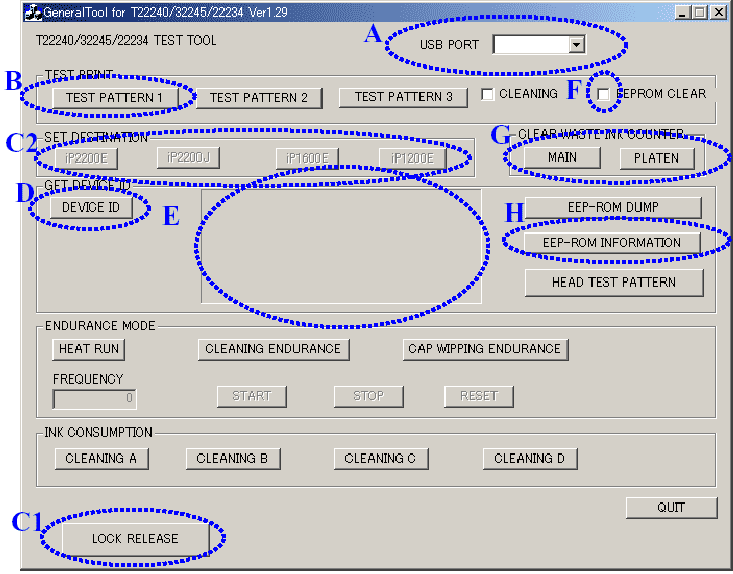
3. Run GeneralTool.exe file
4. Select the connected USB port number from USB PORT
5. Click LOCK RELEASE, and select the applicable model name in SET DESTINATION
6. In CLEAR WASTE INK COUNTER, select MAIN or PLATEN. The selected waste ink counter will be reset. MAIN resets the main waste ink counter, PLATEN resets the platen waste ink counter. If both the main and platen waste ink absorbers are replaced, reset both the main and platen waste ink counters.
iP1200, 1600, 2200 printers Service Tool

ZIP archive: 9 697 kB

I want to:

Any questions about this product?

SEND US REQUEST by filling the form below.


Step 1
ADD TO CART
Step 2
CHECKOUT
Select payment method.
Step 3
Confirm the order.


We are in business since 2002 and do our best to give our customers perfect service!

Our customers reviews:

  Vadimka Vadimka 2010-05-03 12:54:42  
  Спасибо. Все скачалось то что нужно!
  ed dy 2007-06-15 00:30:52  
  Canon service manual for iP1200, ip1600 worked out fine!!
  ary sasmita 2006-08-27 02:03:31  
  Worked fine!
  Heri Putra Kelana 2006-05-12 05:06:13  
  please confirmation canon ip1200,1600,2200 printer service tools.
  Darren Townsend 2020-10-14 21:53:29  
  I purchased four activation keys total, but I had an issue using one. John at tech support got it straightened out and I was able to complete the install on the printer. Now I can set up the CISS unit for Sublimation printing. I'm very happy, and can testify that this product works to unlock the firmware of your printer. (Epson WF-3720)
  Devid Moretton 2015-01-25 19:50:30  
  I found the problem, why the reset diidnt work. it was in depending of the epson status monitor. I was going to the task manager and stopped the status monitor. The problem was \\\"The printer statut manager\\\" After stopping status monitor, the reset was work probably. Thanks
  maxon byakost 2010-01-26 15:23:41  
  http://www.2manuals.com/product_info.php?products_id=1138
  shiju vengad 2009-06-11 16:12:14  
  very good sercvice thank
  alejandro carrillo 2009-05-08 21:22:35  
  me pueden ayudar con el reset de CX7700, CX7800 Service
  sundar sundar 2014-05-16 09:19:25  
  I just downloaded and tried your WIC Reset Utility. Since I am running Windows 8.1 I was afraid that it might not work too well. I was WRONG!! Happily it works GREAT on Windows 8.1! I\'m a happy camper!! Just thought I should let you know!! Best regards, sundar
  shiju vengad 2009-06-11 16:12:40  
  Thanks John I figured it out.. I didn\'t read things as well as I should have.. and panicked a bit. The good news is my Epson 1280 printer is up and running again thanks to your manual. George
  Grzegorz Jaskiewicz 2021-01-22 02:53:39  
  The free trial worked. We will see how long it lasts. Thank you for the help.
Write review



