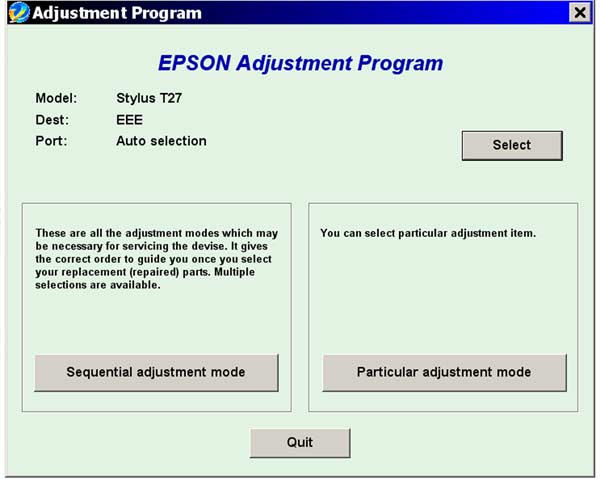
Epson T27 Service Adjustment Program

$9.99
Epson <b>T27</b> Service Adjustment Program
   Click to enlarge
      

The Epson Adjustment Program for Epson T27 can be used under Windows only (Millenium, 2000, XP, Vista [in compatibility mode]).

To find out how to use this utility to reset the waste ink counter we recommend reading the:
5 Clicks Reset Procedure

To get this adjustment program, for the Epson T27 you need to do the following:

  1. Purchase the utility from 2manuals.com.
  2. You'll get download link on-line and in the email message.

We recommend reading the Epson T27 Service Manual before using the adjustment utility.

Please contact us if you have not received your order.

You can run this program under Windows XP, Windows Vista, Windows 7 in compatibility mode. It is easy!

Lets get to know how to set it up.

To configure the compatibility mode for an application, just locate the installation directory and right click on the .exe file (program you want to run), selecting Properties from the menu.

Select the Compatibility tab:


Windows 7 compatibility mode


You can choose to run the program in Windows XP compatibility mode.

FOR THIS PROGRAM please use the WINDOWS XP compatibility mode!!!


Download the program and run in compatibility mode!

I want to:

Any questions about this product?

SEND US REQUEST by filling the form below.


Step 1
ADD TO CART
Step 2
CHECKOUT
Select payment method.
Step 3
Confirm the order.


We are in business since 2002 and do our best to give our customers perfect service!

Our customers reviews:

  Sergey Murzin 2010-01-30 10:53:41  
  http://resetters.ru/index.php?showtopic=21585 - здесь можно скачать утилиту для сброса памперса Т27
  maxon byakost 2010-01-26 15:23:41  
  http://www.2manuals.com/product_info.php?products_id=1138
  DongHwi Park 2023-12-11 18:06:41  
  I didn't go to the AS center and immediately solved it at home, and I'm using tissue to absorb lung ink! It wasn't a waste of money at all! Thanks a lot!
  Wesley Pritchard 2004-02-07 21:55:21  
  The only way to really adjust you printer is by using this program. The owner the printer could not adjust the print using the regular adjustmest utility incleuded in the printer drivers. But this program did the trick. The printer is perfectly adjusted and the owner is very happy with the printer now.
  JEFF GILLINGHAM 2010-11-11 18:45:59  
  very good program,easy to use,saved me throwing away a very good printer.well worth the money.Jeff (uk)
  Bob Heinrichs 2011-02-01 06:09:58  
  Thank-you for helping with resetting waste ink counter. Great service Had printer running in 2 minutes. Thanks again for saving me money and time. Bob
  Alvin Brown 2020-10-26 01:45:31  
  Absolutely fantastic. I got the error message and removed the ink pads ans washed them, don't think I got all the ink out though! Then I used this program as a 'trial' and it worked wonderfully, Printing all OK again and I thought I would need to buy a new printer. When it happens again, I will purchase new pads and a reset key - has to be cheaper than a visit to a repair shop or a new printer. Thank you so much
  Spike Grimme 2020-07-23 12:47:07  
  Oh my golly, I didn't think that would work, but it fixed it in about 30 seconds. Even though I hadn't been able to disable the process monitor thing that it says do first, the reset program still worked instantly when I ran it on an Epson XP-540. If there is one thing that gets my goat in terms of being so unethical both a rip-off financially and environmentally unsustainable, its the way printer companies rip us off. So am super grateful to have found a way round this. For a much more reasonable price than the printer shop told us, and something I could do at home when I needed the printer urgently for work! Thanks so much!
Write review