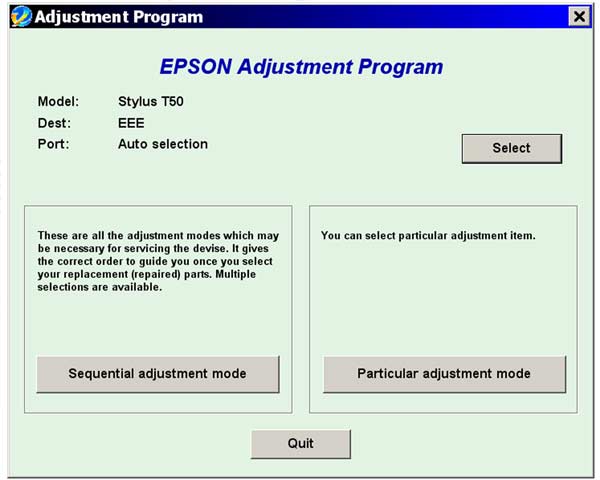
Epson T50, T59 Service Adjustment Program

$9.99
Epson <b>T50, T59</b> Service Adjustment Program
   Click to enlarge
      

FULL T50 ADJUSTMENT PROGRAM. ALL FUNCTIONS WORKING! ver.1.0.1

The Epson Adjustment Program for Epson T50, T59 can be used under Windows only (Millenium, 2000, XP, Vista [in compatibility mode]).

To get this adjustment program, for the Epson T50, T59 you need to do the following:

  1. Purchase the utility from 2manuals.com.
  2. You'll get download link on-line and in the email message too
We recommend reading the Epson T50, T59 Service Manual before using the adjustment utility.

Please contact us if you have not received your order.

I want to:

Any questions about this product?

SEND US REQUEST by filling the form below.


Step 1
ADD TO CART
Step 2
CHECKOUT
Select payment method.
Step 3
Confirm the order.


We are in business since 2002 and do our best to give our customers perfect service!

Our customers reviews:

  Narayan Chakra Borty 2010-09-18 12:22:25  
  Dear sir plz help for Epson T60 Service Adjustment Program FULL Working New! plz confirum t50 t59 service adjustment program work for t60?
  Anonymous 2020-07-06 18:43:29  
  Well...that was scary...I did a check on you and you are trusted so I over road the security settings of my apple mac. And now ...for FREE...my ink pad issues are over for the time being. THANKYOU.
  ramdas.spj@gmail.com kumar 2021-01-06 20:18:19  
  Tried other sites, but they did not work. This one worked like a charm, wish I had found this one first.
  Debora Debora 2015-08-13 21:12:25  
  Amazed that it worked.
It took a few runs on a printer that had been clogged for over a year and finally, perfect nozzle check. Still won\'t quite unclog another machine, but well worth $30.
  sainanda min 2007-08-07 00:58:34  
  My printer stopped printing with the error as \"General Error\" Epson quoted me $60 to send an engineer to fix my printer. After reading through the information on this site I decided to fix it myself. Found the problem was related to the waste ink pad counter. Only 10 minutes, I had the the printer working. The printer tested fine and has done approx 150 pages since with NO issues. Thanks!
  Farhan Hossein 2018-03-04 06:43:56  
  Nevermind. Did more research and to resolve the error, aside the firmware downgrade, I removed the ink, unplugged the printer, turned the printer back on, and placed the Ink's in individually pressing done after each ink. Doing this I was able to get it back up and running again. Thanks!
  ko pink 2014-06-18 13:23:30  
  thank that is fine.next i am down other counter reset software.
  Evgen Test 2010-08-31 09:42:53  
  My printer stopped printing with the error as \"General Error\" Epson quoted me $60 to send an engineer to fix my printer. After reading through the information on this site I decided to fix it myself. Found the problem was related to the waste ink pad counter. Only 10 minutes, I had the the printer working. The printer tested fine and has done approx 150 pages since with NO issues. Thanks for your WIC PROGRAM!
Write review