Epson WorkForce WP-4515, WP-4525, WP-4535, WP-4545, WP-4595 (EURO) Ver.1.1.1 Service Adjustment Program New!

$19.99
Epson <b>WorkForce WP-4515, WP-4525, WP-4535, WP-4545, WP-4595</b> (EURO) Ver.1.1.1 Service Adjustment Program  <font color=red>New!</font>
   Click to enlarge
      

Epson WorkForce WP-4515, WP-4525, WP-4535, WP-4545, WP-4595 (EURO) Ver.1.1.1

This adjustment program is developed for making printers adjustments, Ink charge, paper feed adjustments, printhead power cleaning etc.

The Epson Adjustment Program for New models Epson WorkForce WP-4515, WP-4525, WP-4535, WP-4545, WP-4595 can be used under Windows only (Millenium, 2000, XP, Vista [in compatibility mode]).

To get this adjustment program, for the Epson WorkForce WP-4515, WP-4525, WP-4535, WP-4545, WP-4595 you need to do the following:

  1. Purchase the utility from 2manuals.com.
  2. You'll get download link on-line and in the email message too
We recommend reading the Epson WorkForce WP-4515, WP-4525, WP-4535, WP-4545, WP-4595 Service Manual before using the adjustment utility.

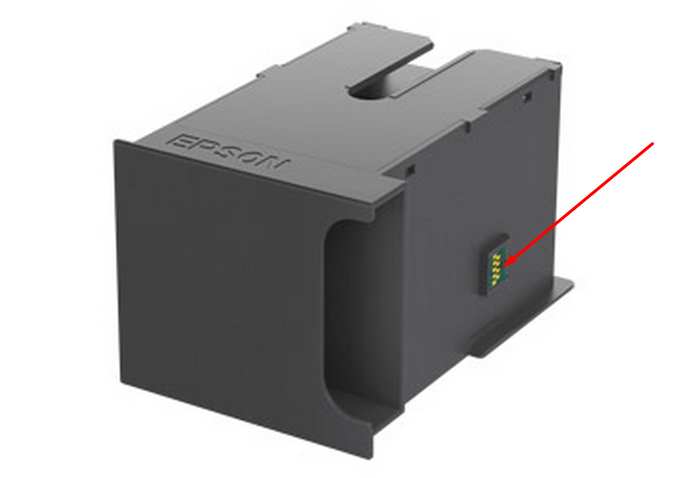
This printer models have separate Waste Ink Maintenance Box with its own IC chip. You can replace Waste Ink Maintenance Box or reset the chip on the Waste Ink Maintenance Box. Read more about how to reset the Waste Ink Maintenance Box.
Please contact us if you have not received your order.

I want to:

Any questions about this product?

SEND US REQUEST by filling the form below.


Step 1
ADD TO CART
Step 2
CHECKOUT
Select payment method.
Step 3
Confirm the order.


We are in business since 2002 and do our best to give our customers perfect service!

  fena can 2011-02-06 15:02:51  
  Very prompt and easy service. I did it by myself in 3 min! You have saved me my money/ Thnx.
  Peter Sam 2009-08-11 11:18:28  
  Thank you so much for prompt reply. The program I received from you works fine. I have resetted 4 printers already! that is what I need. Peter.
  Jhazmin Raya 2020-08-18 20:35:17  
  I have modified the firmware of an Epson wf3620 with the firmware key to make the printer run with chipless ink cartridges. The instructions were clear but must be followed exactly in order for the process to be successful. I am very happy with the result as I have the freedom to use oem ink or not depending on my needs. No oem cartridges now work perfectly well. Well done wic utility people. regds, Peter.
  seba maro 2008-02-18 03:01:02  
  ok muy bueno el program lo se usar muy bien dsfasfsaf adsfdasfafa afsadfsd
  Gbenga Ojo 2023-09-12 02:00:22  
  my canon pixma ts9540 has not pick picking paper properly again since i reset the ink counter. pls help. this is the second printer of the same model it happened to exactly like that. it is this second printer that made me realise it is immediately after the ink counter reset that my printer stop picking paper itself. it just continue jamming. unless i feed it manually deep in the process of picking the papers. kindly help pls. sobddinn@gmail.com is my mail. thanks

Reply:
Printers Waste ink counters doesn't have any relation to paper feed process. Please clean all paper feed rollers
  Paul Inouye 2016-12-16 20:41:53  
  Thanks for the program and manual. I was able to revive a 2 year old 4900. I had 100% blockage in 8 of the 11 heads, and over 50% blockage in the last three.... I ran the ink charge with cleaning fluid. Now I have 100% of the nozzle check pattern on ALL of the heads. I was blown away. I thought for sure I was going to pay for a new head. So, thank you. I also have a an older Epson Stylus Pro 4000. It has been sitting a while and the heads are dried up. Do you have the same program and manual for this printer? I would like to try to revive it as well. If you do could you just send me a link? Thanks again
  Terry Brooks 2023-02-17 17:37:44  
  The WIC Utility worked like a charm for our Epson XP-830! Nice to not have to replace the entire printer. It's running again with no problem. Thanks so much for offering this service. WELL WORTH THE $10! Nice to find lil treasures like this that works in favor of the consumer!
Write review
Shopping Cart more
Shopping Cart is empty


How to pay?
We accept
Credit Cards, PayPal
and Western Union payments


We accept M-Pesa
Pay By M-Pesa
How to Pay by M-Pesa


Buy here or find Resellers in your country:

Argentina

Pay in Argentina Peso

Algeria

EasyPrint-dz.com

Australia

Mir-Aus.com.au

Bangladesh

Pay in Bangladesh by BDT

Brasil

Pay in Brasilian Reals
ReseteadoresWIC
Brasil

Burundi

PrintersAfrica.com

China

Pay in Chineese Yuan

Cote D Ivoire

MonpcImprime.com

Columbia

Pay in Columbian Peso
ReseteadoresWIC

Dominicana

Rellenadodecartuchos.com

DR Congo

Buy in DR Congo

Ecuador

ReseteadoresWIC

Ethiopia

PrintersAfrica.com

France

InkCissPrinter

Ghana

Pay in Ghana Cedis

Germany

InkCissPrinter.com

Japan

Pay in Japaneese Yen

Iran

MahaShop.ir
FixPrinters.ir

Iraq

AlmohandsWorkshop

Indonezia

Pay in Indonesian Rupiahs
FastPrint.co.id

Italia

Inkspeed.it
Stampacontinua.it

Kenya

PrintersAfrica.com
MagiColors.biz

New Zealand

Mir-Aus.com.au

Philippines

Pay in Philippine Peso

Poland

Tusze.info
Progbit.pl
ResetPampersa.pl
ResetWIC.pl

Portugal

Printsemfim.com
InkCissPrinter.com

Romania

CissMarket.ro
Cartuseria.ro
AmDigital.ro

Rwanda

PrintersAfrica.com
Ciss-Solutions.com

Saudi Arabia

Alelm-Alamal.com

Soomaaliya

PrintersAfrica.com

South Sudan

PrintersAfrica.com

Spain

InkCissPrintert.com

Tanzania

PrintersAfrica.com

Turkiye

Cescesor.com

Uganda

PrintersAfrica.com

Vietnam

WIC.vn
ResetKey.net
Want to sell Reset Keys in Your country?
Notifications more
NotificationsNotify me of updates to Epson WorkForce WP-4515, WP-4525, WP-4535, WP-4545, WP-4595 (EURO) Ver.1.1.1 Service Adjustment Program New!





