Epson WorkForce WF-R5190, WF-R5690 (Euro) Ver.1.0.3 Service Adjustment Program New!

$19.99
Epson <b>WorkForce WF-R5190, WF-R5690 </b> (Euro) Ver.1.0.3 Service Adjustment Program  <font color=red>New!</font>
   Click to enlarge
      

Epson WF-R5190, WF-R5690 ADJUSTMENT PROGRAM (Euro) Ver.1.0.3

This adjustment program is developed for making printers adjustments and maintenance such as:

Adjustment
- EEPROM Data Copy
- Initial Setting
- Initialize PF deterioration offset
- Head ID input
- PW sensor initial setting
- Head angular mecha adjustment
- Head angular adjustment
- PF / EJ adjustment
- PW / First dot position adjustment
- PE adjustment
- Bi-D adjustment
- PF band adjustment
- Paper Skew Adjustment
- CR motor heat protection control
- PF motor heat protection control
- PE Detector confirmation
- CR Scale check

Maintenance
- Head cleaning
- Ink charge
- Ink Pressure Release
- Maintenance counter
- Ink leak error reset
- Shipping setting
- Final check pattern print
- EEPROM dump
- Printer information check
- Paper feed test

This adjustment program DOESN'T HAVE Waste Ink Counters Reset function. Read only.
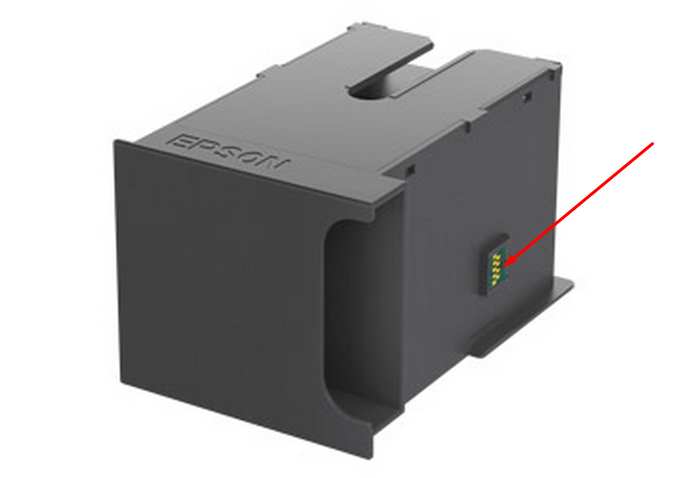
This printer models have separate maintenance cartridge with IC chip that can be reset by hardware chip resetter. No one software can reset chip on maintenance waste ink cartridge in this models.


The Epson Adjustment Program for New models Epson WorkForce WF-R5190, WF-R5690 can be used under Windows only (Millenium, 2000, XP, Vista [in compatibility mode]).

To get this adjustment program, for the Epson WorkForce WF-R5190, WF-R5690 you need to do the following:

  1. Purchase the utility from 2manuals.com.
  2. You'll get download link on-line and in the email message too
We recommend reading the Epson WorkForce WF-R4640, WF-R5190, WF-R5690 Service Manual before using the adjustment utility.

This printer models have separate Waste Ink Maintenance Box with its own IC chip. You can replace Waste Ink Maintenance Box or reset the chip on the Waste Ink Maintenance Box. Read more about how to reset the Waste Ink Maintenance Box.
Please contact us if you have not received your order.

I want to:

Any questions about this product?

SEND US REQUEST by filling the form below.


Step 1
ADD TO CART
Step 2
CHECKOUT
Select payment method.
Step 3
Confirm the order.


We are in business since 2002 and do our best to give our customers perfect service!

  Jens Klapp 2012-03-01 20:37:01  
  PX800FW resetting worked fine. thankyou Jens Klapp
  rdlaw law 2023-01-19 22:37:39  
  It was best $10 I ever paid in my life!!!
  Kent Parker 2020-08-26 22:32:30  
  Having used Epson "reset" utility once, with success on my XP 830, it allowed me a bit more printing time until it just stopped cold. Research found this site. My download from 2manuals was easy as was the entire process and my printer is working once again, no thanks to Epson. I removed the ink pad chamber and replaced the saturated pads with some of my wife's cotton make up pads...Ha ! We'll see how long that lasts. Very similar material. Cheers and thanks for a good product !!
  Tobias Pagel 2022-12-10 16:20:09  
  After an initial trial and after seeing that it worked, I bought a reset key. Works great! 10/10
  Steve Goodey 2004-05-02 04:51:15  
  I was a bit dubious about buying and downloading manual, never having used this site before, but I'm glad I did. With it I was able to sort a problem on my printer. Without it I wouldn't have known where to start. Thank you. Steve Goodey.
  siddayya siddu 2010-09-14 14:30:00  
  thank you for parts manual next time I will use your service, I will introduce more friends to explore your services. thanks a lot.
  Alexandre Crivelaro 2018-05-22 20:31:19  
  I bought refillable cartridges for the Epson XP-241 on AliExpress and did not work. The reason: Epson XP-241 manufactured in the Philippines. I was desperate. The solution: CHIPLESS. You've saved my XP-241 printer. Thank you very much.
  Linda S Perkins 2018-02-15 12:00:09  
  Wow, what a program, it just reset my Epson WF 7525 with inkpad problem. Thank you! Max
Write review
Shopping Cart more
Shopping Cart is empty


How to pay?
We accept
Credit Cards, PayPal
and Western Union payments


We accept M-Pesa
Pay By M-Pesa
How to Pay by M-Pesa


Buy here or find Resellers in your country:

Argentina

Pay in Argentina Peso

Algeria

EasyPrint-dz.com

Australia

Mir-Aus.com.au

Bangladesh

Pay in Bangladesh by BDT

Brasil

Pay in Brasilian Reals
ReseteadoresWIC
Brasil

Burundi

PrintersAfrica.com

China

Pay in Chineese Yuan

Cote D Ivoire

MonpcImprime.com

Columbia

Pay in Columbian Peso
ReseteadoresWIC

Dominicana

Rellenadodecartuchos.com

DR Congo

Buy in DR Congo

Ecuador

ReseteadoresWIC

Ethiopia

PrintersAfrica.com

France

InkCissPrinter

Ghana

Pay in Ghana Cedis

Germany

InkCissPrinter.com

Japan

Pay in Japaneese Yen

Iran

MahaShop.ir
FixPrinters.ir

Iraq

AlmohandsWorkshop

Indonezia

Pay in Indonesian Rupiahs
FastPrint.co.id

Italia

Inkspeed.it
Stampacontinua.it

Kenya

PrintersAfrica.com
MagiColors.biz

New Zealand

Mir-Aus.com.au

Philippines

Pay in Philippine Peso

Poland

Tusze.info
Progbit.pl
ResetPampersa.pl
ResetWIC.pl

Portugal

Printsemfim.com
InkCissPrinter.com

Romania

CissMarket.ro
Cartuseria.ro
AmDigital.ro

Rwanda

PrintersAfrica.com
Ciss-Solutions.com

Saudi Arabia

Alelm-Alamal.com

Soomaaliya

PrintersAfrica.com

South Sudan

PrintersAfrica.com

Spain

InkCissPrintert.com

Tanzania

PrintersAfrica.com

Turkiye

Cescesor.com

Uganda

PrintersAfrica.com

Vietnam

WIC.vn
ResetKey.net
Want to sell Reset Keys in Your country?
Notifications more
NotificationsNotify me of updates to Epson WorkForce WF-R5190, WF-R5690 (Euro) Ver.1.0.3 Service Adjustment Program New!





