Epson WorkForce WF-100 (ECC) Ver.1.0.4 Service Adjustment Program

$9.99
Epson <b>WorkForce WF-100</b> (ECC) Ver.1.0.4 Service Adjustment Program
   Click to enlarge
      

Epson WorkForce WF-7110, WF-7610, WF-7620 (EURO) Ver.1.0.5

This adjustment program is developed for making printers adjustments and maintenance such as:

Adjustment
- Initial Setting
- Initialize PF deterioration offset
- Initialize PW sensor deterioration counter
- Head ID input
- Photo sensor light level adjustment
- PTS delay adjustment
- PW adjustment
- PF / EJ adjustment
- First dot position adjustment
- Top margin adjustment
- Head angular adjustment
- PF band adjustment
- CR motor heat protection control
- PF motor heat protection control
- ASF motor heat protection control

Maintenance
- Head cleaning
- Ink charge
- Shipping setting
- PIC board check
- Final check pattern print
- EEPROM dump
- Printer information check
- Paper feed test

This adjustment program DOESN'T HAVE Waste Ink Counters Reset function.
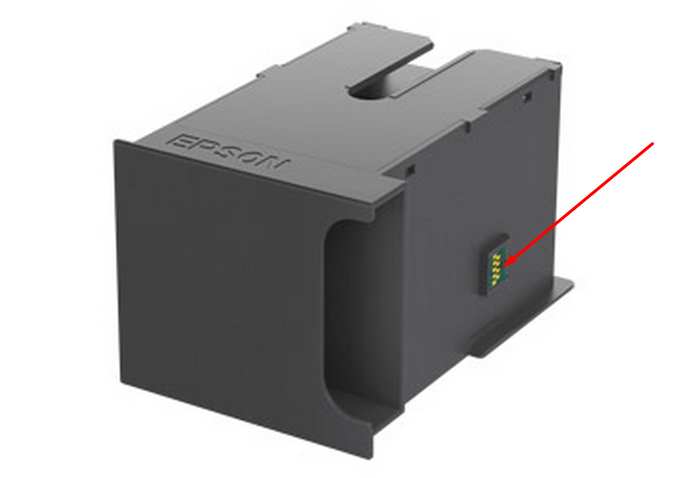
This printer models have separate maintenance cartridge with IC chip that can be reset by hardware chip resetter. No one software can reset chip on maintenance waste ink cartridge in this models.


The Epson Adjustment Program for New model Epson WorkForce WF-100 can be used under Windows only (Millenium, 2000, XP, Vista [in compatibility mode]).

To get this adjustment program, for the Epson WorkForce WF-100 you need to do the following:

  1. Purchase the utility from 2manuals.com.
  2. You'll get download link on-line and in the email message too
We recommend reading the Epson WorkForce WF-100 Service Manual before using the adjustment utility.

This printer models have separate Waste Ink Maintenance Box with its own IC chip. You can replace Waste Ink Maintenance Box or reset the chip on the Waste Ink Maintenance Box. Read more about how to reset the Waste Ink Maintenance Box.
Please contact us if you have not received your order.

I want to:

Any questions about this product?

SEND US REQUEST by filling the form below.


Step 1
ADD TO CART
Step 2
CHECKOUT
Select payment method.
Step 3
Confirm the order.


We are in business since 2002 and do our best to give our customers perfect service!

  amprenta clau 2016-12-22 13:14:48  
  Foarte multumit, am cumparat on-line in 22 decembrie 2016 - codul (Key) - a durat 5-10 minute (inregistrarea pe site si plata), am instalat softul lor in care am introdus codul primit prin e-mail - de la ei si in cateva secunde totul functioneaza ca nou. Imprimanta mea Epson R285 - resetata acum a 2-a oara. Prima data, de frica am apelat la o persoana, care tot aici a resetat-o. Recomand cu drag. Thank You, I recommended Very pleased, I bought online in the December 22, 2016 - code (Key) - lasted 5-10 minutes (registration and payment on site), I installed their software in which we introduced code received via e-mail - from her and within seconds everything works like new. My Epson R285 printer - now reset the 2nd time. First, the fear I turned to someone who here has reset it. I recommend
  Rudi Einstein 2021-02-11 14:04:53  
  Hat auf Anhieb funktioniert !! Danke erstmal für die TRIAL Version , ich kann wieder drucken. (diese Raubritter von Ep...ctc.) Die Vollversion werde ich demnächst sicher kaufen. Gruß Rudi
  Mark Oblena 2011-06-07 06:27:20  
  It saved my printer Epson Stylus Photo 1390. Got the key in less than 5 minutes! Great!!!
  Joseph Bowman 2019-10-24 00:26:55  
  Epson XP-700 working fine till suddely get message saying 'ink pad at end of useful life - contact Epson Service' Epson service not interested as printer no longer under warranty and suggested best option would be to buy a new printer and scrap this one. So not a happy chappy and looked for options to try and resolve this issue. Found this site and downloaded reset program. WIN10 64bit PC connected to printer by WiFi. Ran reset utility - did not find any printers. Switched off printer and re started, disabled Epson Print Utility still no printer found. Rebooted PC and then after it had restarted tried the WIC Reset Utility again after connecting printer through USB. This time WIC found both connections WiFI and USB. Using USB took Reset option and purchased Key. Copied key into WIC utility and OK. Switched Off printer and then switched on and magic no error message and printer back to normal. Very pleased and somewhat relieved as have some printing to complete tonight before tomorrow morning. Very happy to pay £9.97 for this result.
  cyril beckley 2020-11-25 14:07:48  
  Fine! Reset worked!
  sunday omebe 2013-08-28 10:58:28  
  Quick and easy. i have an XP600 and Artisan 725 that were showing the \'waste inkpad error\'. I bough 2 keys and solved a 2 week headache in 10 minutes. Thanks for doing what you do and doing a Great Job in helping people Your the Best Thanks
  david miranda 2016-04-07 16:43:28  
  My Epson Stylus R280 is printing again! This was my favorite printer for photos and quick single-sided jobs. It printed and printed until the dreaded message and alternating flashing orange lights appeared.

I was skeptical that WicReset could do anything because of the flashing lights. I downloaded the Windows version (XP), virus scanned it and after it passed, installed it. I first tried the trial reset that sets the waste counters to 90%. That worked immediately. I bought a key. That worked immediately and now my printer is working like new and waste counters are near 0.

I use a continuous ink system (CIS) on my Epson printers... have for years. This software also has a nice utility to charge the cartridges and clean the heads. My R280 printer sat for a while after the counters reached limit and the ink lines filled with air. I used the WicReset utility to charge & clean, and now it prints like new.

This software is easy to use and guides you step by step. I encountered no difficulties and everything worked first time. It is very good that there are smart engineers out there who took the time to reverse-engineer Epson\'s awful ink pad limitations.

One note of caution, and this has nothing to do with WicReset... I print so much and fear my ink pads will truly overflow, so I\'ll be installing a waste ink tank on my printers. I had one on an ancient R200 printer and it worked great. This is an essential accessory for CIS printers.

Thank you WicReset.
  Anonymous 2020-02-01 22:20:42  
  I have used this ink pad reset utility MANY times on my Epson 1430. Works great! Highly recommend!!
Write review
Shopping Cart more
Shopping Cart is empty


How to pay?
We accept
Credit Cards, PayPal
and Western Union payments


We accept M-Pesa
Pay By M-Pesa
How to Pay by M-Pesa


Buy here or find Resellers in your country:

Argentina

Pay in Argentina Peso

Algeria

EasyPrint-dz.com

Australia

Mir-Aus.com.au

Bangladesh

Pay in Bangladesh by BDT

Brasil

Pay in Brasilian Reals
ReseteadoresWIC
Brasil

Burundi

PrintersAfrica.com

China

Pay in Chineese Yuan

Cote D Ivoire

MonpcImprime.com

Columbia

Pay in Columbian Peso
ReseteadoresWIC

Dominicana

Rellenadodecartuchos.com

DR Congo

Buy in DR Congo

Ecuador

ReseteadoresWIC

Ethiopia

PrintersAfrica.com

France

InkCissPrinter

Ghana

Pay in Ghana Cedis

Germany

InkCissPrinter.com

Japan

Pay in Japaneese Yen

Iran

MahaShop.ir
FixPrinters.ir

Iraq

AlmohandsWorkshop

Indonezia

Pay in Indonesian Rupiahs
FastPrint.co.id

Italia

Inkspeed.it
Stampacontinua.it

Kenya

PrintersAfrica.com
MagiColors.biz

New Zealand

Mir-Aus.com.au

Philippines

Pay in Philippine Peso

Poland

Tusze.info
Progbit.pl
ResetPampersa.pl
ResetWIC.pl

Portugal

Printsemfim.com
InkCissPrinter.com

Romania

CissMarket.ro
Cartuseria.ro
AmDigital.ro

Rwanda

PrintersAfrica.com
Ciss-Solutions.com

Saudi Arabia

Alelm-Alamal.com

Soomaaliya

PrintersAfrica.com

South Sudan

PrintersAfrica.com

Spain

InkCissPrintert.com

Tanzania

PrintersAfrica.com

Turkiye

Cescesor.com

Uganda

PrintersAfrica.com

Vietnam

WIC.vn
ResetKey.net
Want to sell Reset Keys in Your country?
Notifications more
NotificationsNotify me of updates to Epson WorkForce WF-100 (ECC) Ver.1.0.4 Service Adjustment Program





