Epson WorkForce WF-7210, WF-7710, WF-7715, WF-7720 (EURO) Ver.1.0.2 Service Adjustment Program FULL New!

$9.99
Epson <b>WorkForce WF-7210, WF-7710, WF-7715, WF-7720</b> (EURO) Ver.1.0.2 Service Adjustment Program FULL <font color=red>New!</font>
   Click to enlarge
      

Epson WorkForce WF-7210, WF-7710, WF-7715, WF-7720 (EURO) Ver.1.0.2

This adjustment program is developed for making printers adjustments and maintenance such as:

Adjustment
- EEPROM Data Copy
- Initial Setting
- Initialize PF deterioration offset
- Initialize PW sensor deterioration counter
- Head ID input
- PF / EJ adjustment
- PW / First dot position adjustment
- PE adjustment
- Bi-D adjustment
- Head angular adjustment
- PF band adjustment
- Paper Skew Adjustment
- CR motor heat protection control
- PF motor heat protection control
- ASF motor heat protection control
- Scanner/ADF motor heat protection control
- PE detector confirmation

Maintenance
- Head cleaning
- Ink charge
- Maintenance counter
- Shipping setting
- PIC board check
- Final check pattern print
- EEPROM dump
- Printer information check
- Paper feed test

This adjustment program DOESN'T HAVE Waste Ink Counters Reset function. Read only.
This printer models have separate maintenance cartridge with IC chip that can be reset by hardware chip resetter. No one software can reset chip on maintenance waste ink cartridge in this models.


The Epson Adjustment Program for New models Epson WorkForce WF-7210, WF-7710, WF-7715, WF-7720 can be used under Windows only (Millenium, 2000, XP, Vista, 7, 8, 10, 11 [in compatibility mode]).

To get this adjustment program, for the Epson WorkForce WF-7210, WF-7710, WF-7715, WF-7720 you need to do the following:

  1. Purchase the utility from 2manuals.com.
  2. You'll get download link on-line and in the email message too
We recommend reading the Epson WorkForce WF-7210, WF-7710, WF-7720 Service Manual before using the adjustment utility.

This printer models have separate Waste Ink Maintenance Box with its own IC chip. You can replace Waste Ink Maintenance Box or reset the chip on the Waste Ink Maintenance Box. Read more about how to reset the Waste Ink Maintenance Box.
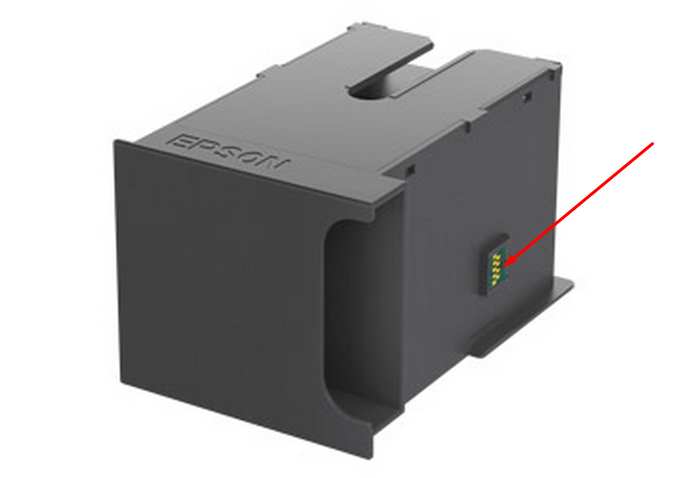

For this models Chipless Firmware is available:
WF-7210 chipless firmware

Please contact us if you have not received your order.

I want to:

Any questions about this product?

SEND US REQUEST by filling the form below.


Step 1
ADD TO CART
Step 2
CHECKOUT
Select payment method.
Step 3
Confirm the order.


We are in business since 2002 and do our best to give our customers perfect service!

  samita dey 2019-08-24 12:10:47  
  Rapide et efficace, très simple à acheter et à utiliser pour le reset de mon imprimante Epson Stylus SX210. Merci
  an lyquoc 2007-08-17 22:13:51  
  Thank you! I paid less for my Epson R320 1 year ago than Epson want for servicing it. I had printed a head a nozzle check 2 days ago when I put in a new cartrige all printouts were perfect but today my Printer told me it needed service and refused to work. Your fix showed me two things the Ink wells did not need flushing as stated by the Epson Tech and that my printer had been set to only run half the usual plates so that was why the service notice cam up so soon after I purchased it.
  Hadi Suryadi 2017-01-05 05:19:58  
  Very helpful, I can reset my epson L1800 printer counter in seconds so I can catch my deadline thanks for your efforts team!!
  george prionidis 2009-02-11 00:00:35  
  thank you for fast respond I will recommend you to all my friends in Iran and Emirate UAE You are the best and god be with you!
  wahid ahmady 2013-02-19 16:37:42  
  This worked a treat, many thanks. Epson, just like most other printer manufacturers just want to rip us all off. Thanks to you guys it can be avoided in part. All the best
  supri adie 2004-11-23 18:28:32  
  looking for information about manual service and maintenance of lq 1170 dot matrix printer
  Jean-Louis Boulin 2020-08-03 18:51:10  
  Good job THX ! My Epson ET-2550 working again Best regards
Write review
Shopping Cart more
Shopping Cart is empty


How to pay?
We accept
Credit Cards, PayPal
and Western Union payments


We accept M-Pesa
Pay By M-Pesa
How to Pay by M-Pesa


Buy here or find Resellers in your country:

Argentina

Pay in Argentina Peso

Algeria

EasyPrint-dz.com

Australia

Mir-Aus.com.au

Bangladesh

Pay in Bangladesh by BDT

Brasil

Pay in Brasilian Reals
ReseteadoresWIC
Brasil

Burundi

PrintersAfrica.com

China

Pay in Chineese Yuan

Cote D Ivoire

MonpcImprime.com

Columbia

Pay in Columbian Peso
ReseteadoresWIC

Dominicana

Rellenadodecartuchos.com

DR Congo

Buy in DR Congo

Ecuador

ReseteadoresWIC

Ethiopia

PrintersAfrica.com

France

InkCissPrinter

Ghana

Pay in Ghana Cedis

Germany

InkCissPrinter.com

Japan

Pay in Japaneese Yen

Iran

MahaShop.ir
FixPrinters.ir

Iraq

AlmohandsWorkshop

Indonezia

Pay in Indonesian Rupiahs
FastPrint.co.id

Italia

Inkspeed.it
Stampacontinua.it

Kenya

PrintersAfrica.com
MagiColors.biz

New Zealand

Mir-Aus.com.au

Philippines

Pay in Philippine Peso

Poland

Tusze.info
Progbit.pl
ResetPampersa.pl
ResetWIC.pl

Portugal

Printsemfim.com
InkCissPrinter.com

Romania

CissMarket.ro
Cartuseria.ro
AmDigital.ro

Rwanda

PrintersAfrica.com
Ciss-Solutions.com

Saudi Arabia

Alelm-Alamal.com

Soomaaliya

PrintersAfrica.com

South Sudan

PrintersAfrica.com

Spain

InkCissPrintert.com

Tanzania

PrintersAfrica.com

Turkiye

Cescesor.com

Uganda

PrintersAfrica.com

Vietnam

WIC.vn
ResetKey.net
Want to sell Reset Keys in Your country?
Notifications more
NotificationsNotify me of updates to Epson WorkForce WF-7210, WF-7710, WF-7715, WF-7720 (EURO) Ver.1.0.2 Service Adjustment Program FULL New!





