Epson L130, L220, L310, L360, L365 Adjustment Program unlimited ftime ull version for ONE PC
This Epson L130, L220, L310, L360, L365 adjustment program can be used under Windows XP, 7, 8, 10
(or under higher versions [in Windows XP compatibility mode]) with USB connection only.
How to buy unlimited version for One PC:
1. Log In to Your 2Manuals account
2. Download HardWare ID Utility HWID.exe, run it and copy yours PC Hardware ID
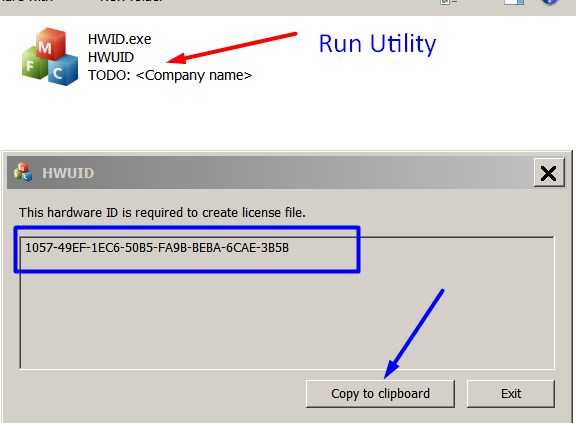
Note! You have to disable antivirus or put HWID.exe file to ignore list!
3. Put this item (License for One PC for L130, L220, L310, L360, L365 ) in to your shopping cart
4. Go to payment page and enter HardWare ID in to specified field:
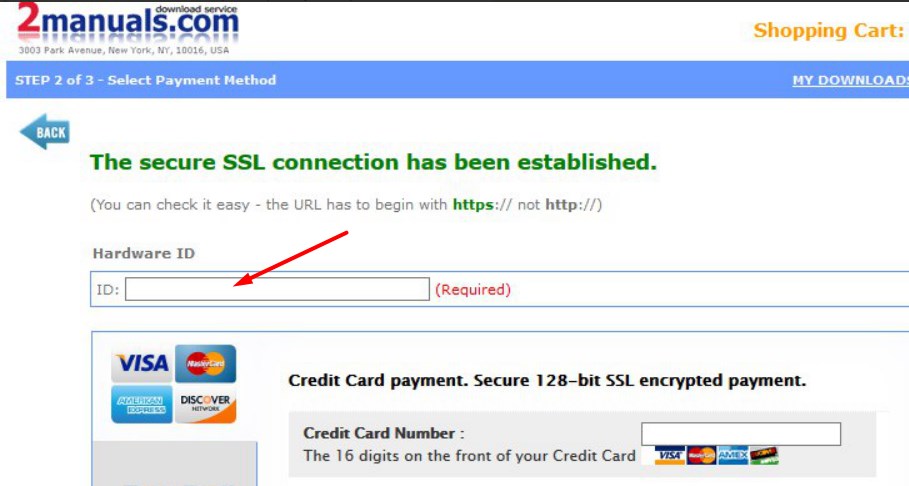
5. Make payment and You will get download link with Epson L130, L220, L310, L360, L365 Program with the License file included
6. Put L130, L220, L310, L360, L365 Adjustment Program to Antivirus Ignore list or disable Antivirus. Then Run AdjProg.exe.
With this Epson L130, L220, L310, L360, L365 Program You can make adjustment procedures and Initial Ink Charge to clean and unclog printhead and waste ink reset as well.
To get this adjustment program, for the Epson L130, L220, L310, L360, L365 you need to do the following:
- Purchase the utility from 2manuals.com.
- You'll be able to download program immediately after your payment transaction is complete.
before using the adjustment utility.
Please contact us if you have not received your order.
More information about Ink Charge - powerfull printhead cleaning
I purchased the adjustment program last night and got to work on it today.
I had a clog in C and it would not clear. I ve had my L220 for over 2 years and have been able to handle them until now.
I learned about this site from another site that has cleaner for the L220 and said I need to buy this software first. I bought it and tried it with the epson ink that was in my printer. I ran the adjustment and it cleared C but then there were other clogs. Because they werent clogged before I started, I cleared them the normal way through the printers options. Had they not cleared, I would have ran the adjustment again.
I had tried everything to get C to clear for a week and this program did it in one try!
I would highly recommend this for clearing a stubborn clog. And now it is in my arsenal if I get another one that I cant clear down the road. By the way, it does not work if your printer is networked. Mine was so I had to move a computer into the room with my printer, directly connect to it and install the drivers. Then it work fine.
If you got a clog that you cant fix, just buy it.
Ivan Tilbury
|
|
|
|
|
Step 1
ADD TO CART |
Step 2
CHECKOUT
Select payment method. |
Step 3
Confirm the order. |
|
|
We are in business since 2002 and do our best to give our customers perfect service!
|
| Anonymous | 2020-08-14 14:18:58 | | I can't believe how easily my seemingly unfixable problem was solved by this site. Thank you so much, will definitely buy after the free trial! | |  | TAMMY OAKLEY-PRIOR | 2011-04-27 22:42:22 | | Excellent! Thank you! What a brilliant utility!.................................................................................................. | | | Ross Beale | 2008-10-01 05:33:22 | | | Aferinyt Afyka | 2004-05-14 00:33:54 | | All appears to be fine .
Many Thanks for your help. | | | fer mon | 2011-08-06 16:16:20 | | NECESITARĶA LA LLAVE PARA LIMPIAR UNA EPSON STYLUS PHOTO RX-585 | | | Mary Jon Mary Jon | 2009-08-07 14:55:10 | | thanks for your help, i have got the manual now, its is a great service you offer | | | Toshio Kawasome | 2020-07-01 05:30:32 | | Thank you guys, my Epson XP-440 is working again - done the chipless procedure.
Most grateful! Keep up the good work!
Gabriel Jackson | | | Ronald Guevarra | 2020-07-19 18:26:14 | | Great software! Helped me out most when i needed. Downloaded software and used the trail key and instantly reset my printer, will definitely purchase key next time when needed. Thanks | |
|





 Total customers: 446658
 Customers online: 186








