Activation Key for making Epson XP-2100, XP-2101, XP-2105, XP-2150, EW-052A Chipless Printers (for one device only)

$40.00 $35.00
<b>Activation Key</b> for making Epson XP-2100, XP-2101, XP-2105, XP-2150, EW-052A Chipless Printers (for one device only)
   Click to enlarge
      

Activation Key for making Epson XP-2100, XP-2101, XP-2105, XP-2150, EW-052A Chipless!

Be sure Your printer can be modified to Chipless Version.

Don't buy Activation Key before You have checked if Your printers Firmware can be changed to Chipless! Make following steps.

Step 1
Download and extract Zip archive with XP-2100, XP-2101, XP-2105, XP-2150, EW-052A Firmware  - MZ01JA version

Step 2
Connect printer to PC (with Windows OS) by proper USB cable.
Disable all Epson processes and services. You can do this manually using task manager and administration tools or You can do this via WIC Reset Utility (install and run it, then select MENU Support -> Disable processes in the main menu).

Step 3
Upload Firmware to printer in the NORMAL MODE (do NOT use service mode yet just start the printer with the power button). Run EPFWUPD.EXE file and follow all steps until Firmware will upload in printer. 
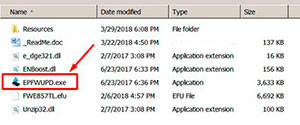
XP-2100, XP-2101, XP-2105, XP-2150, EW-052A  chipless firmware

When Firmware Update process is complete - printer will restart - usually it will take only a few minutes but can continue for 10-20 minutes in some rare cases. 
If process hangs or stops at 80-99% - replug power cable and start printer manually.

Now check current firmware version ( how to check ).
If firmware version is MZ01JA - firmware has been uploaded successfully. You can go to next Step.
If NO - restart the printer and try once more time.

What do You have to do next after uploading chipless firmware?

1. Buy this Activation Key
2. Download License.exe application (Windows only) - download here
3. Run License.exe under Windows and press Activate Online button
4. Input Activation Key and press Ok!

Please keep in mind - there are 2 types of keys:
- Regular Activation Key (HAS expiration date of using);
- No Expiration date Activation Key (can be used whenever You want in 10 years).


Buy Activation Key after You have successfully uploaded Firmware to Your printer!

Prices and discounts:

Regular Activation Keys (HAS expiration date and couldn't be used after has expired):
1 Activation Key - $35
5 Activation Keys - $32 per Key
20 Activation Keys - $30 per Key
You can pay by Visa, MC etc. :
Here
or by PayPal and other systems - Here

NO EXPIRATION Activation Keys (has NO expiration date - can be used whenever You want):
1 Activation Key - $38
5 Activation Keys - $33 per Key
20 Activation Keys - $30 per Key
You can pay by PayPal, Visa, MC etc. :
Here

*The code is one-time use.

If You have any questions - You can read or place Your questions at Chipless thread at our Discussion Board - https://forum.2manuals.com/index.php?/topic/80414-chiplesssolutions-chipless-firmware-for-epson-printers-chip-virtual/


Step 1
ADD TO CART
Step 2
CHECKOUT
Select payment method.
Step 3
Confirm the order.


We are in business since 2002 and do our best to give our customers perfect service!

Our customers reviews:

  eduar faundes 2020-08-22 19:39:55  
  My XP-4100 printer has recognized the old (but new) empty cartridge, I can also refill it with a syringe. This is a good economic solution.
  david miranda 2016-04-07 16:43:28  
  My Epson Stylus R280 is printing again! This was my favorite printer for photos and quick single-sided jobs. It printed and printed until the dreaded message and alternating flashing orange lights appeared.

I was skeptical that WicReset could do anything because of the flashing lights. I downloaded the Windows version (XP), virus scanned it and after it passed, installed it. I first tried the trial reset that sets the waste counters to 90%. That worked immediately. I bought a key. That worked immediately and now my printer is working like new and waste counters are near 0.

I use a continuous ink system (CIS) on my Epson printers... have for years. This software also has a nice utility to charge the cartridges and clean the heads. My R280 printer sat for a while after the counters reached limit and the ink lines filled with air. I used the WicReset utility to charge & clean, and now it prints like new.

This software is easy to use and guides you step by step. I encountered no difficulties and everything worked first time. It is very good that there are smart engineers out there who took the time to reverse-engineer Epson\'s awful ink pad limitations.

One note of caution, and this has nothing to do with WicReset... I print so much and fear my ink pads will truly overflow, so I\'ll be installing a waste ink tank on my printers. I had one on an ancient R200 printer and it worked great. This is an essential accessory for CIS printers.

Thank you WicReset.
  ary sasmita 2006-08-27 02:03:31  
  Worked fine!
  Hengdri Hengdri 2020-01-08 22:01:33  
  Reset my Epson 1430 in a minute. Easy. Had looked around at buying a new printer but really had no time for that anyway. I do not have a waste tank but looking to get one of these soon too. Whew! glad this exists! I was afraid I was in a real pickle.
  jam epson 2008-07-15 15:29:21  
  I need it
  Alessandro Comunian 2011-10-31 20:06:30  
  Perfetto! Qualche difficoltà nel registrare la chiave ma dopo mezz'ora dall'acquisto è stata "digerita" dal software! 9.99$ ben spesi!!!
  Josh Preston 2020-01-19 16:48:29  
  reset ink pads on Epson xp 720 in a few minutes, wonderful
  John Phillip Dandal 2019-08-20 03:47:03  
  Easy to use, but quite the rip off. Why can't it just be a free utility?
  Harley Rodrigues 2008-03-22 15:56:40  
  oi tudo bem estou precisando do resete da epson cx5900 cx8300 sei que voces s?o americanos e por isso talvez n?o ir?o entender nada que estou escrevendo mas se por um acaso entenderem por favor me mandei este dois reset
Write review
Shopping Cart more
Shopping Cart is empty


How to pay?
We accept
Credit Cards, PayPal
and Western Union payments


We accept M-Pesa
Pay By M-Pesa
How to Pay by M-Pesa


Buy here or find Resellers in your country:

Argentina

Pay in Argentina Peso

Algeria

EasyPrint-dz.com

Australia

Mir-Aus.com.au

Bangladesh

Pay in Bangladesh by BDT

Brasil

Pay in Brasilian Reals
ReseteadoresWIC
Brasil

Burundi

PrintersAfrica.com

China

Pay in Chineese Yuan

Cote D Ivoire

MonpcImprime.com

Columbia

Pay in Columbian Peso
ReseteadoresWIC

Dominicana

Rellenadodecartuchos.com

DR Congo

Buy in DR Congo

Ecuador

ReseteadoresWIC

Ethiopia

PrintersAfrica.com

France

InkCissPrinter

Ghana

Pay in Ghana Cedis

Germany

InkCissPrinter.com

Japan

Pay in Japaneese Yen

Iran

MahaShop.ir
FixPrinters.ir

Iraq

AlmohandsWorkshop

Indonezia

Pay in Indonesian Rupiahs
FastPrint.co.id

Italia

Inkspeed.it
Stampacontinua.it

Kenya

PrintersAfrica.com
MagiColors.biz

New Zealand

Mir-Aus.com.au

Philippines

Pay in Philippine Peso

Poland

Tusze.info
Progbit.pl
ResetPampersa.pl
ResetWIC.pl

Portugal

Printsemfim.com
InkCissPrinter.com

Romania

CissMarket.ro
Cartuseria.ro
AmDigital.ro

Rwanda

PrintersAfrica.com
Ciss-Solutions.com

Saudi Arabia

Alelm-Alamal.com

Soomaaliya

PrintersAfrica.com

South Sudan

PrintersAfrica.com

Spain

InkCissPrintert.com

Tanzania

PrintersAfrica.com

Turkiye

Cescesor.com

Uganda

PrintersAfrica.com

Vietnam

WIC.vn
ResetKey.net
Want to sell Reset Keys in Your country?
Notifications more
NotificationsNotify me of updates to Activation Key for making Epson XP-2100, XP-2101, XP-2105, XP-2150, EW-052A Chipless Printers (for one device only)