License for 1 PC for Epson L6570, L6580 Adjustment Program Full Reset Version

$19.99
License for 1 PC for Epson <b>L6570, L6580</b> Adjustment Program Full Reset Version
   Click to enlarge
      

Licence for 1 PC for Epson L6570, L6580 Adjustment Program V 1.0.3 (EURO)

This Epson L6570, L6580 adjustment program can be used under Windows XP, 7, 8, 10 with USB connection only. Download here. Password - 12345

How to buy unlimited version for One PC:

1. Log In to Your 2Manuals account

2. Download HardWare ID Utility HWID.exe, run it and copy yours PC Hardware ID
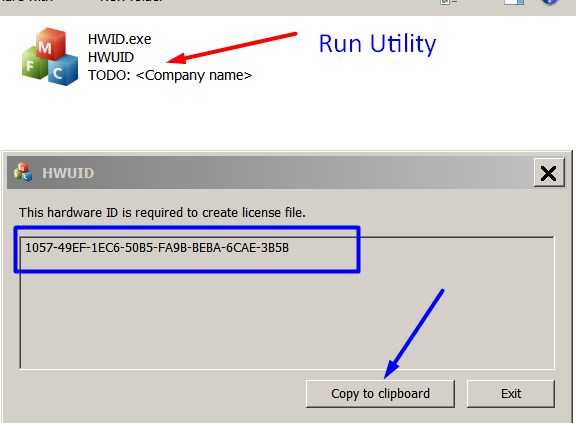
Note! You have to disable antivirus or put HWID.exe file to ignore list!

3. Put this item (License for One PC) in to your Shopping cart

4. Go to payment page and enter HardWare ID in to specified field:
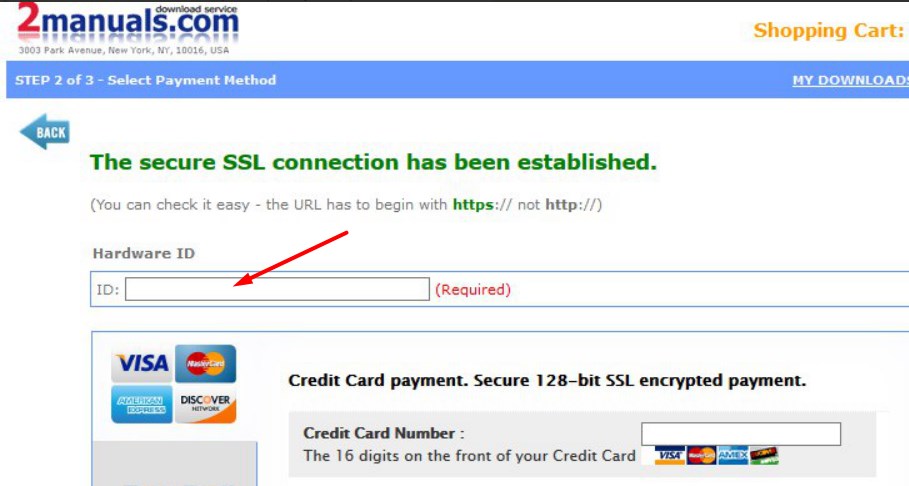

5. Make payment and You will get download link with Epson L6570, L6580 Adjustment Program with the License file included

6. Put Adjustment Program to Antivirus Ignore list or disable Antivirus. Then Run AdjProg.exe.

With this Epson Adjustment Program You can make adjustment procedures, Initial Ink Charge to clean and unclog printhead and PLATEN Waste Ink Pad Counter Reset unlimited times.
Keep in mind - this model has separate Maintenance Tans with chip that can be reset by Chip Resetter only! Any software can reset maintenance chip.

To get this adjustment program you need to do the following:

  1. Purchase the utility from 2manuals.com.
  2. You'll be able to download program immediately after your payment transaction is complete.

We recommend reading the Epson L6570, L6580 Service Manual

before using the adjustment utility.

Please contact us if you have not received your order.


Any questions about this product?

SEND US REQUEST by filling the form below.


Step 1
ADD TO CART
Step 2
CHECKOUT
Select payment method.
Step 3
Confirm the order.


We are in business since 2002 and do our best to give our customers perfect service!

  hüseyin tüzün 2010-12-28 15:00:21  
  Thank you, got it on-line!
  Karlheinz Hasenburg 2020-11-10 19:55:47  
  Perfektes Produkt! Drucker Epson XP-860 problemlos erkannt, eindeutige Benutzerführung, nach Kauf des Lizenzschlüssels einwandfreie Funktion. Vielen Dank!
  yimer tellez 2011-05-17 23:10:05  
  nesecito la clave para resetear la epson stylus tx 600fw por favor colaborenme gracias por su atencion prestada
  dinesh kumar 2011-01-20 15:01:18  
  Went to town and bought a cable. Printer status is now restored. Thank you. I\'m not the most computer tech person which added to the confusion. I do suspect there maybe a few others like myself that you could lessen some confussion by including a note that says \"if your printer is connected by wifi it will be necessary to use a USB cable during the hack\". Thank you again for the program. It made me both mad and sick to think that after so little use of this printer that I was going to have to throw it out. Gratefully yours, Dinesh Kumar
  Georgia Dippel 2016-12-07 21:59:08  
  My Epson R260 quit working- read up online what the cause was (counters in printer). I downloaded the WIC Utility package and sure enough the counter was at 100.70%. I downloaded the Reset Key- at first it didn't work. Turned the printer off & on as instructed. Still didn't work. Finally I turned the monitoring on- reset the printer. Then turned monitoring off again and reset the printer & it finally worked. I think the monitoring just got hung up somehow- computers!!! I'm very thankful I'm good for another few years. It only cost $9.99 instead of the price of buying another printer (and I have all these ink cartridges that would go to waste)- OR a repair bill & would be without it while being fixed. Would I buy another Epson printer- NO- but would I recommend 2manuals for the fix- Definitely.
  Manish Lama 2024-08-08 13:27:09  
  this helps me remove all wasted of printer. this helps me remove all wasted of printer. this helps me remove all wasted of printer. this helps me remove all wasted of printer. this helps me remove all wasted of printer. this helps me remove all wasted of printer. this helps me remove all wasted of printer.
Write review
Shopping Cart more
Shopping Cart is empty


How to pay?
We accept
Credit Cards, PayPal
and Western Union payments


We accept M-Pesa
Pay By M-Pesa
How to Pay by M-Pesa


Buy here or find Resellers in your country:

Argentina

Pay in Argentina Peso

Algeria

EasyPrint-dz.com

Australia

Mir-Aus.com.au

Bangladesh

Pay in Bangladesh by BDT

Brasil

Pay in Brasilian Reals
ReseteadoresWIC
Brasil

Burundi

PrintersAfrica.com

China

Pay in Chineese Yuan

Cote D Ivoire

MonpcImprime.com

Columbia

Pay in Columbian Peso
ReseteadoresWIC

Dominicana

Rellenadodecartuchos.com

DR Congo

Buy in DR Congo

Ecuador

ReseteadoresWIC

Ethiopia

PrintersAfrica.com

France

InkCissPrinter

Ghana

Pay in Ghana Cedis

Germany

InkCissPrinter.com

Japan

Pay in Japaneese Yen

Iran

MahaShop.ir
FixPrinters.ir

Iraq

AlmohandsWorkshop

Indonezia

Pay in Indonesian Rupiahs
FastPrint.co.id

Italia

Inkspeed.it
Stampacontinua.it

Kenya

PrintersAfrica.com
MagiColors.biz

New Zealand

Mir-Aus.com.au

Philippines

Pay in Philippine Peso

Poland

Tusze.info
Progbit.pl
ResetPampersa.pl
ResetWIC.pl

Portugal

Printsemfim.com
InkCissPrinter.com

Romania

CissMarket.ro
Cartuseria.ro
AmDigital.ro

Rwanda

PrintersAfrica.com
Ciss-Solutions.com

Saudi Arabia

Alelm-Alamal.com

Soomaaliya

PrintersAfrica.com

South Sudan

PrintersAfrica.com

Spain

InkCissPrintert.com

Tanzania

PrintersAfrica.com

Turkiye

Cescesor.com

Uganda

PrintersAfrica.com

Vietnam

WIC.vn
ResetKey.net
Want to sell Reset Keys in Your country?
Notifications more
NotificationsNotify me of updates to License for 1 PC for Epson L6570, L6580 Adjustment Program Full Reset Version





