Epson L8050 (ESP) Ver.1.0.0 Service Adjustment Program No Limited New!

$19.99
Epson <b>L8050</b> (ESP) Ver.1.0.0 Service Adjustment Program  No Limited <font color=red>New!</font>
   Click to enlarge
      

Epson L8050 (ESP) Ver.1.0.0 Service Adjustment Program

This adjustment program is developed for making printers adjustments and maintenance such as:

Adjustment
- EPROM Data Copy
- Initial Setting
- Head ID input
- Initialize PF deterioration offset
- Initialize PW sensor deterioration counter
- Initialize CDR-ID tray deteriolation offset
- Photo sensor light level adjustment
- PF motor heat protection control
- CR motor heat protection control
- RASF motor heat protection control
- PTS delay adjustment
- Head angular adjustment
- Bi-D adjustment
- PW/1st dot position adjustment
- PF / EJ adjustment
- PF band adjustment
- PE adjustment

Maintenance
- Head Cleaning
- Ink charge
- Ink eject (All ink)
- Waste Ink Pad Counter
- Shipping setting

This adjustment program DOESN'T HAVE Main Waste Ink Counters Reset function.

The Epson Adjustment Program for Epson L8050 can be used under Windows only (Millenium, 2000, XP, Vista [in compatibility mode]).

To get this adjustment program, for the Epson L8050 you need to do the following:

  1. Purchase the utility from 2manuals.com.
  2. You'll get download link on-line and in the email message too
We recommend reading the Epson L8050 Service Manual before using the adjustment utility.

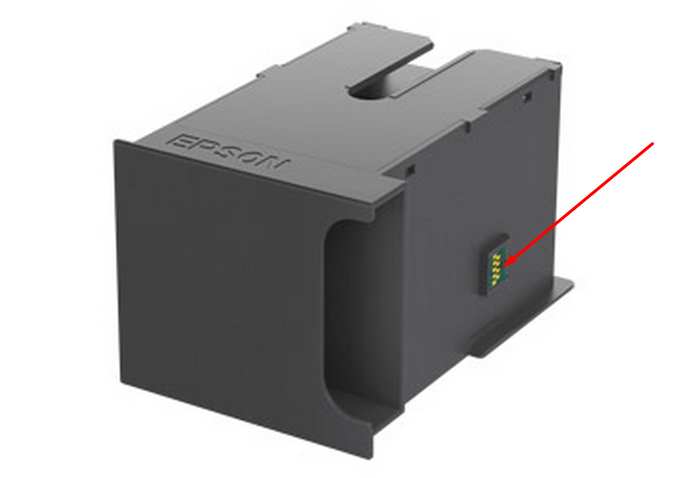
This printer models have separate Waste Ink Maintenance Box with its own IC chip. You can replace Waste Ink Maintenance Box or reset the chip on the Waste Ink Maintenance Box by Chip Resetter.
Read more about how to reset the Waste Ink Maintenance Box.
Please contact us if you have not received your order.

I want to:

Any questions about this product?

SEND US REQUEST by filling the form below.


Step 1
ADD TO CART
Step 2
CHECKOUT
Select payment method.
Step 3
Confirm the order.


We are in business since 2002 and do our best to give our customers perfect service!

  Farhan Hossein 2018-03-04 06:43:56  
  Nevermind. Did more research and to resolve the error, aside the firmware downgrade, I removed the ink, unplugged the printer, turned the printer back on, and placed the Ink's in individually pressing done after each ink. Doing this I was able to get it back up and running again. Thanks!
  yasuyuki kawasaki 2020-06-13 17:31:24  
  thanks guys ..i couldnt sort this problem out until i came across your site
  josue salcido 2020-04-19 19:43:05  
  Thank you for helping me reset my printer and for the free trial key. You saved my day.
  Manish Lama 2024-08-08 13:27:09  
  this helps me remove all wasted of printer. this helps me remove all wasted of printer. this helps me remove all wasted of printer. this helps me remove all wasted of printer. this helps me remove all wasted of printer. this helps me remove all wasted of printer. this helps me remove all wasted of printer.
  Harley Rodrigues 2008-03-22 15:56:40  
  oi tudo bem estou precisando do resete da epson cx5900 cx8300 sei que voces s?o americanos e por isso talvez n?o ir?o entender nada que estou escrevendo mas se por um acaso entenderem por favor me mandei este dois reset
  David Morris 2011-11-02 15:33:04  
  I was a bit unsure about trying this at first but thought its only about fiver so give it a try, and i'm glad i did, it's so simple and you save money as well, i had a slight problem with the reset key at first so i e-mailed 2manuals, They sent me a new key and i was all sorted in less than no time . I would highly recomend,worth every penny. David Morris, Gwent, South Wales u.k
  Dylan Vandagrifft 2024-02-08 22:11:41  
  At first I thought I was going to have to spend a lot of money and have to spend a lot of time fixing my issue. It was actually the complete opposite, it was very cheap/affordable and super easy to do. They give you all the steps and explain everything very clearly. do not waste your time with dealing with Epson. This was definitely the best decision to make. Will be back when I need to reset my printer again! Thank you 2manuals.com!!!!! To bad there isnt an AMAZING rating!!
  Paulo Joaquim 2010-10-13 10:32:49  
  Great! It worked and I have now my printer working again! Epson D78
Write review
Shopping Cart more
Shopping Cart is empty


How to pay?
We accept
Credit Cards, PayPal
and Western Union payments


We accept M-Pesa
Pay By M-Pesa
How to Pay by M-Pesa


Buy here or find Resellers in your country:

Argentina

Pay in Argentina Peso

Algeria

EasyPrint-dz.com

Australia

Mir-Aus.com.au

Bangladesh

Pay in Bangladesh by BDT

Brasil

Pay in Brasilian Reals
ReseteadoresWIC
Brasil

Burundi

PrintersAfrica.com

China

Pay in Chineese Yuan

Cote D Ivoire

MonpcImprime.com

Columbia

Pay in Columbian Peso
ReseteadoresWIC

Dominicana

Rellenadodecartuchos.com

DR Congo

Buy in DR Congo

Ecuador

ReseteadoresWIC

Ethiopia

PrintersAfrica.com

France

InkCissPrinter

Ghana

Pay in Ghana Cedis

Germany

InkCissPrinter.com

Japan

Pay in Japaneese Yen

Iran

MahaShop.ir
FixPrinters.ir

Iraq

AlmohandsWorkshop

Indonezia

Pay in Indonesian Rupiahs
FastPrint.co.id

Italia

Inkspeed.it
Stampacontinua.it

Kenya

PrintersAfrica.com
MagiColors.biz

New Zealand

Mir-Aus.com.au

Philippines

Pay in Philippine Peso

Poland

Tusze.info
Progbit.pl
ResetPampersa.pl
ResetWIC.pl

Portugal

Printsemfim.com
InkCissPrinter.com

Romania

CissMarket.ro
Cartuseria.ro
AmDigital.ro

Rwanda

PrintersAfrica.com
Ciss-Solutions.com

Saudi Arabia

Alelm-Alamal.com

Soomaaliya

PrintersAfrica.com

South Sudan

PrintersAfrica.com

Spain

InkCissPrintert.com

Tanzania

PrintersAfrica.com

Turkiye

Cescesor.com

Uganda

PrintersAfrica.com

Vietnam

WIC.vn
ResetKey.net
Want to sell Reset Keys in Your country?
Notifications more
NotificationsNotify me of updates to Epson L8050 (ESP) Ver.1.0.0 Service Adjustment Program No Limited New!





