Epson L3550, L3556, L5590 (ESP) Ver.1.0.0 Service Adjustment Program No Limited New!

$9.99
Epson <b>L3550, L3556, L5590</b> (ESP) Ver.1.0.0 Service Adjustment Program  No Limited <font color=red>New!</font>
   Click to enlarge
      

Epson L3550, L3556, L5590 (ESP) Ver.1.0.0 Service Adjustment Program

This adjustment program is developed for making printers adjustments and maintenance such as:

Adjustment
- EPROM Data Copy
- Initial Setting
- Head ID input
- Initialize PF deterioration offset
- PF motor heat protection control
- CR motor heat protection control
- Scanner motor heat protection control
- PTS delay adjustment
- PF / EJ adjustment
- PF band adjustment
- First dot position adjustment
- Head angular adjustment
- Bi-D adjustment
- Paper skew adjustment
- TOF/BOF adjustment

Maintenance
- Head Cleaning
- Ink charge
- Waste Ink Pad Counter
- Shipping setting
- Printer startup mode selection

Appendix
- Final check pattern print
- EEPROM dump
- Printer information check
- Paper feed test

The Epson Adjustment Program for Epson L3550, L3556, L5590 can be used under Windows only (Millenium, 2000, XP, Vista [in compatibility mode]).

To get this adjustment program, for the Epson L3550, L3556, L5590 you need to do the following:

  1. Purchase the utility from 2manuals.com.
  2. You'll get download link on-line and in the email message too
We recommend reading the Epson L3550, L3556, L5590 Service Manual before using the adjustment utility.

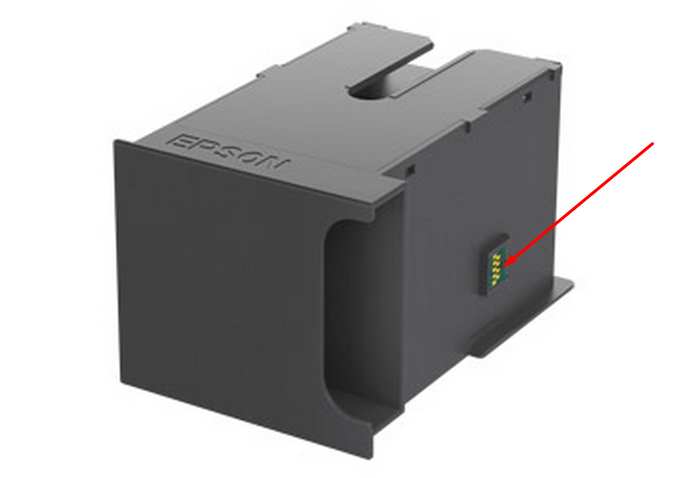
This printer models have separate Waste Ink Maintenance Box with its own IC chip. You can replace Waste Ink Maintenance Box or reset the chip on the Waste Ink Maintenance Box. Read more about how to reset the Waste Ink Maintenance Box.
Please contact us if you have not received your order.

I want to:

Any questions about this product?

SEND US REQUEST by filling the form below.


Step 1
ADD TO CART
Step 2
CHECKOUT
Select payment method.
Step 3
Confirm the order.


We are in business since 2002 and do our best to give our customers perfect service!

  Ian Horsfield 2019-06-04 17:52:49  
  Great, was very dubious, but bought the key and it rest the counter. Great thank you. Hope it lasts though!
  jay agu 2025-06-30 01:39:37  
  This is your sign that this is legitimate. Easy process and worked exactly as described.
  Cheryl Riley 2019-09-16 23:55:34  
  Hi John, I just want to thank you so much for the reset key and software.  I paid you $9.99 to get those lights to stop flashing and it the software worked in a matter of minutes!  I really appreciate your service, without it I would have to buy a new printer (which I don't want to do right now!). Thank you again, you provide a great service. Cheryl
  Petr Brousek 2025-08-11 23:01:56  
  Hello, all was OK, thank you very much from Czech Republic. Petr
  Jonathan Lorrimer 2013-02-26 00:47:58  
  Brilliant. Spent a long time looking for a Mac version to reset my Epson. Worked a treat!
  Franco Gigliotti 2012-10-03 10:11:21  
  Veramente efficace e veloce. Sono pi volte che utilizzo il programma WIC e mi sono trovato sempre bene. Certo, bisogna svuotare la vaschetta di recupero dell\'inchiostro. Se no...
  Jeff Carbone 2019-05-01 09:36:34  
  I love printing hard copies of material to review. I bought an Epson EcoTank 2650 for the single purpose of never having to worry about how much I have to print.

When I found out about the ink pad and how it basically “fills up” and prevents you from printing, I was pretty pissed off.

I called a service center in my state in the US and they wanted $110 to replace the ink pad and reset it. I searched hard for a solution and when I found this I was really sure this was a scam.

I tried it from one of your affiliates (octoinkjets) and did the trial to reset it to 90% and it worked.

Thank god you guys have this tool. I bought a key for $10 and was done with it. Watched a video on how to clean the ink pads and it was super easy. Now I have a new printer basically.

I can’t believe Epson gets away with this crap. You guys rock!
It really took a leap of faith to try this.
Write review
Shopping Cart more
Shopping Cart is empty


How to pay?
We accept
Credit Cards, PayPal
and Western Union payments


We accept M-Pesa
Pay By M-Pesa
How to Pay by M-Pesa


Buy here or find Resellers in your country:

Argentina

Pay in Argentina Peso

Algeria

EasyPrint-dz.com

Australia

Mir-Aus.com.au

Bangladesh

Pay in Bangladesh by BDT

Brasil

Pay in Brasilian Reals
ReseteadoresWIC
Brasil

Burundi

PrintersAfrica.com

China

Pay in Chineese Yuan

Cote D Ivoire

MonpcImprime.com

Columbia

Pay in Columbian Peso
ReseteadoresWIC

Dominicana

Rellenadodecartuchos.com

DR Congo

Buy in DR Congo

Ecuador

ReseteadoresWIC

Ethiopia

PrintersAfrica.com

France

InkCissPrinter

Ghana

Pay in Ghana Cedis

Germany

InkCissPrinter.com

Japan

Pay in Japaneese Yen

Iran

MahaShop.ir
FixPrinters.ir

Iraq

AlmohandsWorkshop

Indonezia

Pay in Indonesian Rupiahs
FastPrint.co.id

Italia

Inkspeed.it
Stampacontinua.it

Kenya

PrintersAfrica.com
MagiColors.biz

New Zealand

Mir-Aus.com.au

Philippines

Pay in Philippine Peso

Poland

Tusze.info
Progbit.pl
ResetPampersa.pl
ResetWIC.pl

Portugal

Printsemfim.com
InkCissPrinter.com

Romania

CissMarket.ro
Cartuseria.ro
AmDigital.ro

Rwanda

PrintersAfrica.com
Ciss-Solutions.com

Saudi Arabia

Alelm-Alamal.com

Soomaaliya

PrintersAfrica.com

South Sudan

PrintersAfrica.com

Spain

InkCissPrintert.com

Tanzania

PrintersAfrica.com

Turkiye

Cescesor.com

Uganda

PrintersAfrica.com

Vietnam

WIC.vn
ResetKey.net
Want to sell Reset Keys in Your country?
Notifications more
NotificationsNotify me of updates to Epson L3550, L3556, L5590 (ESP) Ver.1.0.0 Service Adjustment Program No Limited New!





