License for 1 PC for Epson Sure Color SC-P7500, SC-P9500 Series Service Adjustment Program for printhead unclogging, counters resets, printer adjustments and maintenance. 100% working all functions

$35.00
License for 1 PC for Epson  <b>Sure Color SC-P7500, SC-P9500 Series</b> Service Adjustment Program for printhead unclogging, counters resets, printer adjustments and maintenance. 100% working all functions
   Click to enlarge
      

Epson Sure Color SC-P7500, SC-9500 Series Service Adjustment Program for printhead unclogging, counters resets, printer adjustments and maintenance for ONE PC unlimited.

This Epson Sure Color SC-P7500, SC-9500 Series adjustment program can be used under Windows XP, 7, 8, 10 with USB connection only.

Important information:

1. This application requires Microsoft Compact SQL Server in order to run properly:
https://www.microsoft.com/en-US/download/details.aspx?id=30709
Please, run standalone installer SSCERuntime_x64-ENU.exe from the SQL folder.

2. Please, unpack this application to C:/EPTOOL/ folder to make sure it works properly.
Main executable must have path C:/EPTOOL/ServiceSupportTool.exe assuming that you system drive is C:

How to buy unlimited version for One PC:

1. Log In to Your 2Manuals account

2. Download HardWare ID Utility HWID.exe, run it and copy yours PC Hardware ID
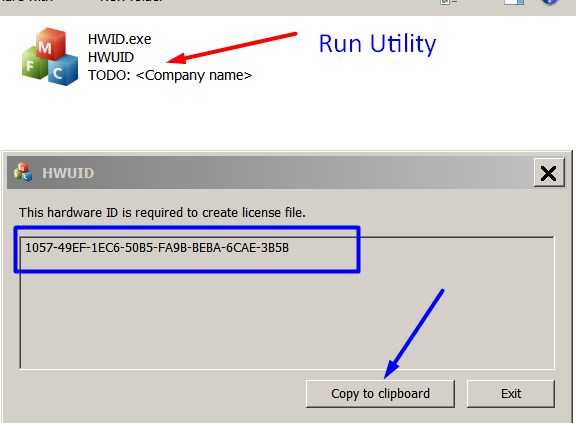
Note! You have to disable antivirus or put HWID.exe file to ignore list!

3. Put this item in to your shopping cart

4. Go to payment page and enter HardWare ID in to specified field:
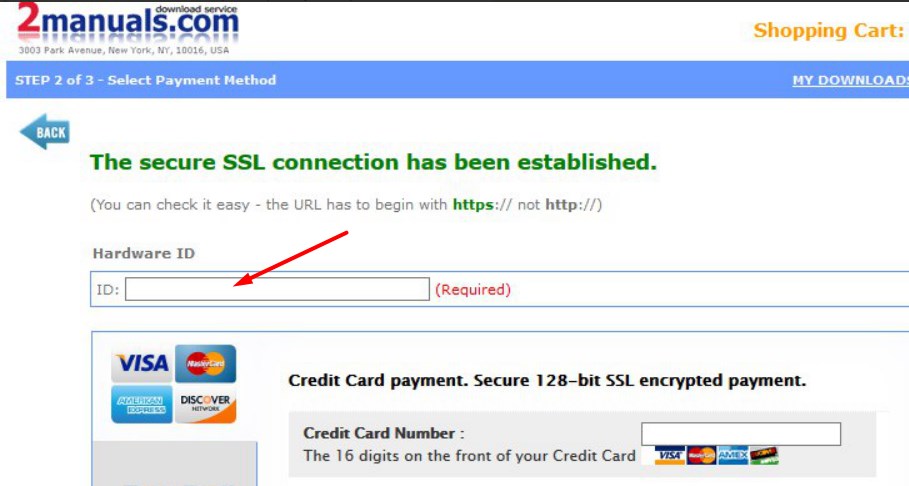

5. Make payment and You will get download link with Epson Sure Color SC-P7500, SC-9500 Series Adjustment Program with the License file included. Download ZIP Archive to your PC and extract files to the folder on Your PC.

6. Put Epson Sure Color SC-P7500, SC-9500 Series Adjustment Program to Antivirus Ignore list or disable Antivirus. Then Run ServProg.exe.

If You want to pay by PayPal - Go Here to pay by PayPal

With this Epson Epson Sure Color SC-P7500, SC-9500 Series Program You can make adjustment and maintenance procedures and Initial Ink Charge to clean and unclog printhead.


To get this adjustment program, for the Epson Sure Color SC-P7500, SC-9500 Series you need to do the following:

  1. Download Epson Sure Color SC-P7500, SC-9500 Series Adjustment Program.
  2. Buy this item - License for ONE PC for Epson Sure Color SC-P7500, SC-9500 Series Adjustment Program. You'll be able to download License file immediately after your payment transaction is complete.

We recommend reading the Epson Sure Color SC-P7500, SC-9500 Series Service Manual

before using the adjustment utility.

Please contact us if you have not received your order.

Any questions about this product?

SEND US REQUEST by filling the form below.


Step 1
ADD TO CART
Step 2
CHECKOUT
Select payment method.
Step 3
Confirm the order.


We are in business since 2002 and do our best to give our customers perfect service!

  svenn svenson 2012-03-05 19:14:52  
  THIS IS A MUST HAVE UTILITY This reset key worked perfectly for my Epson Artisan 800. I tried the Epson reset utility (free from Epson) many times. It would "reset" the counter to "40%", then upon turning printer off - on, it would revert to "0%" with the error message that the inkpads had reached their end of life. This also happened whenever I performed a head cleaning. For those of us who use a CIS (I am not affiliated with inkproducts.com - but have been using their CIS for a couple of years and LOVE the quality and service) - it is imperative to be able to reset this waste ink counter. I should also add, the waste ink pad issue is real - don't expect to simply reset the waste ink counter and go happily on your printing way - you will have a disaster and you will experience frequent head clogging. You MUST use an external waste ink disposal system - either make your own for $5 or buy one. THIS + the reset utility is what enables you to get the true value from your CIS-modified printer.
  john ahlering 2015-10-02 01:52:03  
  Have had series of 8 Epson Printers. Artisan 837 had over 12700 printed pages and 4000 4x6 photos when it gave up the ghost with \"inkpads have reached end of life\" error.
I spent hours with Epson Support level 2 and they were very nice. Printer \"out of warranty\" so how about a new one. Went to Amazon and Bought Epson Expression 860.

Epson support said take Artisan to Epson Authorized Repair Center....I did. They said \"it\'s out of warranty, we can\'t waste the time (or money) trying to fix it!!\"

Used Epson Reset key from Epson 10 times and each time it , the error on inkpads, recurred. The Epson Utility does not do diagnosis like WIC Reset Utility!! Bottom line...Fixed my own machine for very small price and I am ECSTATIC! Thank You, Thank you and Thank you!! Very Happy in San Diego
  Indie Nin 2025-04-07 05:34:00  
  This was quick, easy and effective. Thanks. I'll be buying more reset keys. Quite a bit cheaper than buying a new printer!
  Jhazmin Raya 2020-08-18 20:35:17  
  I have modified the firmware of an Epson wf3620 with the firmware key to make the printer run with chipless ink cartridges. The instructions were clear but must be followed exactly in order for the process to be successful. I am very happy with the result as I have the freedom to use oem ink or not depending on my needs. No oem cartridges now work perfectly well. Well done wic utility people. regds, Peter.
  dinesh kumar 2011-01-20 15:01:18  
  Went to town and bought a cable. Printer status is now restored. Thank you. I\'m not the most computer tech person which added to the confusion. I do suspect there maybe a few others like myself that you could lessen some confussion by including a note that says \"if your printer is connected by wifi it will be necessary to use a USB cable during the hack\". Thank you again for the program. It made me both mad and sick to think that after so little use of this printer that I was going to have to throw it out. Gratefully yours, Dinesh Kumar
Write review
Shopping Cart more
Shopping Cart is empty


How to pay?
We accept
Credit Cards, PayPal
and Western Union payments


We accept M-Pesa
Pay By M-Pesa
How to Pay by M-Pesa


Buy here or find Resellers in your country:

Argentina

Pay in Argentina Peso

Algeria

EasyPrint-dz.com

Australia

Mir-Aus.com.au

Bangladesh

Pay in Bangladesh by BDT

Brasil

Pay in Brasilian Reals
ReseteadoresWIC
Brasil

Burundi

PrintersAfrica.com

China

Pay in Chineese Yuan

Cote D Ivoire

MonpcImprime.com

Columbia

Pay in Columbian Peso
ReseteadoresWIC

Dominicana

Rellenadodecartuchos.com

DR Congo

Buy in DR Congo

Ecuador

ReseteadoresWIC

Ethiopia

PrintersAfrica.com

France

InkCissPrinter

Ghana

Pay in Ghana Cedis

Germany

InkCissPrinter.com

Japan

Pay in Japaneese Yen

Iran

MahaShop.ir
FixPrinters.ir

Iraq

AlmohandsWorkshop

Indonezia

Pay in Indonesian Rupiahs
FastPrint.co.id

Italia

Inkspeed.it
Stampacontinua.it

Kenya

PrintersAfrica.com
MagiColors.biz

New Zealand

Mir-Aus.com.au

Philippines

Pay in Philippine Peso

Poland

Tusze.info
Progbit.pl
ResetPampersa.pl
ResetWIC.pl

Portugal

Printsemfim.com
InkCissPrinter.com

Romania

CissMarket.ro
Cartuseria.ro
AmDigital.ro

Rwanda

PrintersAfrica.com
Ciss-Solutions.com

Saudi Arabia

Alelm-Alamal.com

Soomaaliya

PrintersAfrica.com

South Sudan

PrintersAfrica.com

Spain

InkCissPrintert.com

Tanzania

PrintersAfrica.com

Turkiye

Cescesor.com

Uganda

PrintersAfrica.com

Vietnam

WIC.vn
ResetKey.net
Want to sell Reset Keys in Your country?
Notifications more
NotificationsNotify me of updates to License for 1 PC for Epson Sure Color SC-P7500, SC-P9500 Series Service Adjustment Program for printhead unclogging, counters resets, printer adjustments and maintenance. 100% working all functions





