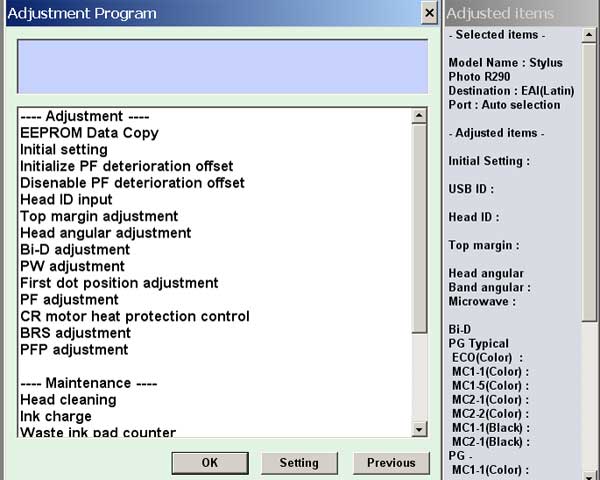
Epson R290 Printers Adjustment Service Program

$9.99
Epson R290 Printers Adjustment Service Program
   Click to enlarge
      

The Epson Adjustment Program for Epson R290 can be used under Windows only (Millenium, 2000, XP, Vista [in compatibility mode]).

To find out how to use this utility to reset the waste ink counter we recommend reading the:
5 Clicks Reset Procedure

To get this adjustment program, for the Epson R290 you need to do the following:

  1. Purchase the utility from 2manuals.com.
  2. You'll get download link on-line and in the email message.

We recommend reading the Epson R290 Service Manual before using the adjustment utility.

Please contact us if you have not received your order.

You can run this program under Windows XP, Windows Vista, Windows 7 in compatibility mode. It is easy!

Lets get to know how to set it up.

To configure the compatibility mode for an application, just locate the installation directory and right click on the .exe file (program you want to run), selecting Properties from the menu.

Select the Compatibility tab:


Windows 7 compatibility mode


You can choose to run the program in Windows XP compatibility mode.

FOR THIS PROGRAM please use the WINDOWS XP compatibility mode!!!


Download the program and run in compatibility mode!

I want to:

Any questions about this product?

SEND US REQUEST by filling the form below.


Step 1
ADD TO CART
Step 2
CHECKOUT
Select payment method.
Step 3
Confirm the order.


We are in business since 2002 and do our best to give our customers perfect service!

Our customers reviews:

  Rafael Calderon 2010-04-13 06:28:23  
  I woul like the info for reset a Epson R 280. Can i do it with your manual?
  bellaoui ahmed 2010-02-24 02:16:45  
  r 280 epson cx 7300 service manuals epson adjustment programs
  tony dean 2010-02-20 15:13:27  
  i downloaded epson r285 adjustment program!
  Ivan Tilbury 2015-09-08 06:01:35  
  I purchased the epson adjustment program last night and got to work on it today.
I had a clog in C and it would not clear. I ve had my 4900 for over 2 years and have been able to handle them until now.
I learned about this site from another site that has cleaner for the 4900 and said I need to buy this software first. I bought it and tried it with the epson ink that was in my printer. I ran the adjustment and it cleared C but then there were other clogs. Because they werent clogged before I started, I cleared them the normal way through the printers options. Had they not cleared, I would have ran the adjustment again.
I had tried everything to get C to clear for a week and this program did it in one try!

I would highly recommend this for clearing a stubborn clog. And now it is in my arsenal if I get another one that I cant clear down the road. By the way, it does not work if your printer is networked. Mine was so I had to move a computer into the room with my printer, directly connect to it and install the drivers. Then it work fine.
If you got a clog that you cant fix, just buy it.
  Michael Chelinsky 2015-09-17 18:57:24  
  This was awesome. I was skeptical at first, but the program worked beautifully. Thank you for helping me, where Epson couldn\'t. I truly appreciate it! Great investment, happy camper.
  Angelique Hahn 2015-09-25 22:32:04  
  oh all good now john! it was my first time using this and i’m very impressed! super happy with the result and how fast i could use my printer, yay! thanks again!
  hamacher rainer 2015-09-26 00:51:30  
  Today my Epson printer stopped working. I have the tool they provide to reset the ink pad counter but it simply reports network error after network error trying to connect to the Epson server.
Since its Christmas eve and I need to print some gifts for my kids I was totally hooped until I found you guys. I just want to thank you for doing what Epson was unable to do. They suck, you rock!
Robert
  john ahlering 2015-10-02 01:52:03  
  Have had series of 8 Epson Printers. Artisan 837 had over 12700 printed pages and 4000 4x6 photos when it gave up the ghost with \"inkpads have reached end of life\" error.
I spent hours with Epson Support level 2 and they were very nice. Printer \"out of warranty\" so how about a new one. Went to Amazon and Bought Epson Expression 860.

Epson support said take Artisan to Epson Authorized Repair Center....I did. They said \"it\'s out of warranty, we can\'t waste the time (or money) trying to fix it!!\"

Used Epson Reset key from Epson 10 times and each time it , the error on inkpads, recurred. The Epson Utility does not do diagnosis like WIC Reset Utility!! Bottom line...Fixed my own machine for very small price and I am ECSTATIC! Thank You, Thank you and Thank you!! Very Happy in San Diego
  Hugo Daniel Musso 2015-10-19 17:13:35  
  I have an Epson PX710w it is a brilliant printer, happy was I...but then....
the now infamous \"end of life\" message appeared.
After hours of research I found that Epson had a free download to reset and service printer, I downloaded only to find it did not work.
On contacting epsonuk I was told that there is no reset utility or program for uk Epson printers and that I must take it to my local Epson service centre.... this would cost £80 plus vat and parts! more than a new printer.
After advice from forums and many ebay offers of a \"genuine\" reset utility/key, I found 2manuals.com.
through them I \"chatted\" with John who assured me it would work, despite Epson uk advice, and so proceeded to purchase.
from start to finish it took less than ten minutes and I now have a fully working printer for a Meer $10 (about £8)
I cannot recommend this company any higher ..... thank you very much 2manuals and John and one up on big greedy corporation\'s.

Andrew in UK
  Schaun Smuts 2015-10-23 11:16:13  
  I was amazed how easy that was. I was in doubt that this simple download would work... with my heart racing!

I entered the key,and there it was, all fixed.

2manuals, I must say, what you said it would do, it did, and I\'m so relieved and happy, and can work again.

The success of this has made me want to write a review on your product right away.

Thank you so much

Robert Dorsey President/CEO Cabin Watch Fine Time Wear
Write review