License for 1 PC for Epson SC-T3100, SC-T3400, SC-T3450, SC-T5100, SC-T5400, SC-T5450, SC-F500, SC-F570, SC-F600 Series EPTool version 1.4.1 - Adjustment Program

$49.99
License for 1 PC for Epson <b> SC-T3100, SC-T3400, SC-T3450, SC-T5100, SC-T5400, SC-T5450, SC-F500, SC-F570, SC-F600  Series</b> EPTool version 1.4.1 - Adjustment  Program
   Click to enlarge
      

License for 1 PC for Epson SC-T3100, SC-T3400, SC-T3450, SC-T5100, SC-T5400, SC-T5450, SC-F500, SC-F570, SC-F600 series Extol version 1.4.1 Adjustment Program (Epson Service Support Tool)

How to buy unlimited version for One PC:

1. Log In to Your 2Manuals account

2. Download HardWare ID Utility HWID.exe, run it and copy yours PC Hardware ID
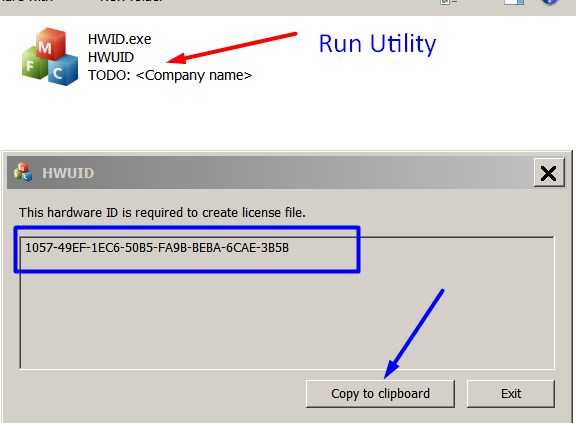
Note! You have to disable antivirus or put HWID.exe file to ignore list!

3. Put this item (License for One PC) in to your Shopping cart

4. Go to payment page and enter HardWare ID in to specified field:
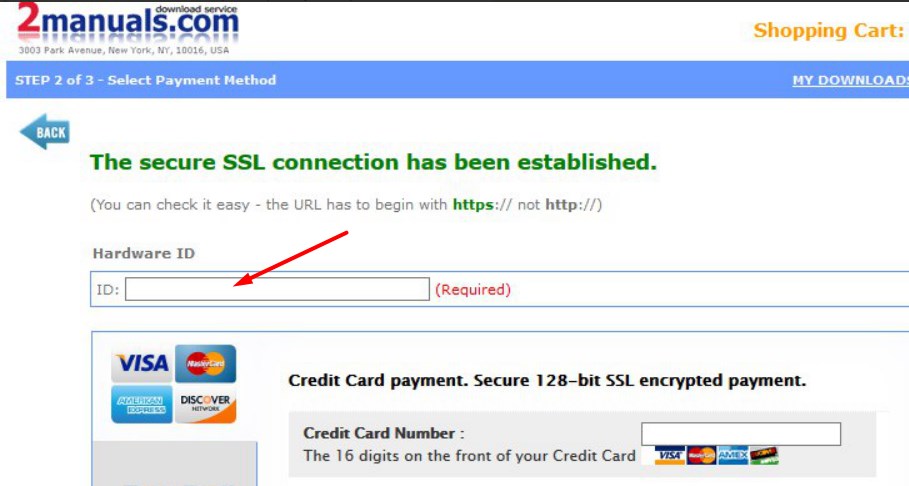

5. Make payment and You will get download link with Epson SC-T3100, SC-T3400, SC-T3450, SC-T5100, SC-T5400, SC-T5450, SC-F500, SC-F600 Adjustment Program with the License file included

6. Put Adjustment Program to Antivirus Ignore list or disable Antivirus. Then Run the program.

What next?

  1. Purchase License for one PC.
  2. You'll get download link for Epson SC-T3100, SC-T3400, SC-T3450, SC-T5100, SC-T5400, SC-T5450, SC-F500, SC-F600 Adjustment Program for ONE PC in email message immediately after your payment transaction is complete.

We recommend reading the Epson SC-T3100, SC-T3400, SC-T3450, SC-T5100, SC-T5400,SC-T5450, SC-F500, SC-F600 Service Manual

before using the adjustment utility.

We dont have Free Epson SC-T3100, SC-T3400, SC-T3450, SC-T5100, SC-T5400,SC-T5450, SC-F500, SC-F600 resetter.

Any questions about this product?

SEND US REQUEST by filling the form below.


Step 1
ADD TO CART
Step 2
CHECKOUT
Select payment method.
Step 3
Confirm the order.


We are in business since 2002 and do our best to give our customers perfect service!

  saad ali 2010-05-29 19:57:11  
  install incoder strip and printhead carrage and timing belt
  planeta cartucho 2009-06-20 19:32:14  
  Excellent value for money. Try It, you\'ll see!
  Russell Thielemann 2016-06-29 09:28:59  
  An excellent service that works. Don't be fooled by the printer manufacturers that you are trapped into buying their over priced cartridges because you thought you were doing the right thing by upgrading the firmware. The only reason for their upgrade was to stop you from using your own cheaper 3rd party ink cartridges. If you accidentally did do the upgrade as they recommended don't worry as you can undo that costly mistake with the help of "wicreset". It really works. Also did you know that 3rd party cartridges actually contain around 25% more ink than oem cartridges?
  İSMAİL BAYRAKTAR 2010-07-07 15:52:19  
  The reset key of Epson Px 650 worked properly. Artisan 810 also.
  jim stewart 2007-10-19 17:28:10  
  I spent 4 hours trying to get my r340 to work then l I used your program to reset the protection counter. I have just printed 5 pages and 4 disks. Slightly cryptic instructions but it worked perfectly. it took me all of 5 minutes.
  roberto zabeo 2020-01-21 05:34:46  
  I am looking for the solution of printer problem and I see this website wish will help me out I m so thankfull for the help of solution because I was already looking for free key but is nothing I only see an offer from 2manuals.com and it is really helps me othersways when I m can do it will recommendation to other people to using this way to solve out in same problem and in next time will be carefull to using printer. when we dont know how to reset printer and i found 2manuals.com to help me adn guide me to how do this
  anca neamu 2012-11-21 23:52:26  
  went very good for my epson dx5000. must have no firewall, no proxy and after that MUST restart computer. i did not get that in the first place. thanks...
  Jakov Frumin 2009-01-05 22:37:02  
  ok
Write review
Shopping Cart more
Shopping Cart is empty


How to pay?
We accept
Credit Cards, PayPal
and Western Union payments


We accept M-Pesa
Pay By M-Pesa
How to Pay by M-Pesa


Buy here or find Resellers in your country:

Argentina

Pay in Argentina Peso

Algeria

EasyPrint-dz.com

Australia

Mir-Aus.com.au

Bangladesh

Pay in Bangladesh by BDT

Brasil

Pay in Brasilian Reals
ReseteadoresWIC
Brasil

Burundi

PrintersAfrica.com

China

Pay in Chineese Yuan

Cote D Ivoire

MonpcImprime.com

Columbia

Pay in Columbian Peso
ReseteadoresWIC

Dominicana

Rellenadodecartuchos.com

DR Congo

Buy in DR Congo

Ecuador

ReseteadoresWIC

Ethiopia

PrintersAfrica.com

France

InkCissPrinter

Ghana

Pay in Ghana Cedis

Germany

InkCissPrinter.com

Japan

Pay in Japaneese Yen

Iran

MahaShop.ir
FixPrinters.ir

Iraq

AlmohandsWorkshop

Indonezia

Pay in Indonesian Rupiahs
FastPrint.co.id

Italia

Inkspeed.it
Stampacontinua.it

Kenya

PrintersAfrica.com
MagiColors.biz

New Zealand

Mir-Aus.com.au

Philippines

Pay in Philippine Peso

Poland

Tusze.info
Progbit.pl
ResetPampersa.pl
ResetWIC.pl

Portugal

Printsemfim.com
InkCissPrinter.com

Romania

CissMarket.ro
Cartuseria.ro
AmDigital.ro

Rwanda

PrintersAfrica.com
Ciss-Solutions.com

Saudi Arabia

Alelm-Alamal.com

Soomaaliya

PrintersAfrica.com

South Sudan

PrintersAfrica.com

Spain

InkCissPrintert.com

Tanzania

PrintersAfrica.com

Turkiye

Cescesor.com

Uganda

PrintersAfrica.com

Vietnam

WIC.vn
ResetKey.net
Want to sell Reset Keys in Your country?
Notifications more
NotificationsNotify me of updates to License for 1 PC for Epson SC-T3100, SC-T3400, SC-T3450, SC-T5100, SC-T5400, SC-T5450, SC-F500, SC-F570, SC-F600 Series EPTool version 1.4.1 - Adjustment Program





