Epson PP-50, PP-50BD, PP-100, PP-100N, PP-100AP, PP-100II Adjustment Program
This adjustment program is developed for making PP-50, PP-50BD, PP-100, PP-100N, PP-100AP, PP-100II Disc Producer adjustments and maintenance
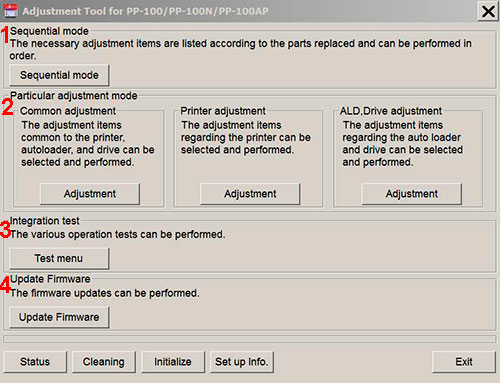
Adjustment program for Epson PP-50, PP-50BD, PP-100, PP-100N, PP-100AP, PP-100II Disc Producers has 4 main sections:
1. Sequential mode includes necessary adjustment items according to the parts replaced and can be performed in order
2. Particular adjustment mode includes 3 parts:
- Common adjustments - adjustments common to the printer, autoloader and drive.
- Printer adjustments - adjustments items regarding the printer.
- ALD, Drive adjustments - adjustments items regarding auto loader and drive.
3. Integration test - various operation tests can be performed in this section.
4. Update Firmware - the firmware updates can be performed in this section.
NOTE: Reset Drives function is NOT AVAILABLE for PP-100II model!
This adjustment program DOESN'T HAVE such functions as Waste Ink Counters Reset
If You need Waste Ink Counters reset - please use the WIC Reset Utility - Download here
Epson PP-50, PP-50BD, PP-100, PP-100N, PP-100AP, PP-100II
Adjustment Program can be used under Windows only (Millenium, 2000, XP, 7, 8, 10 Vista [in compatibility mode]).
To get this adjustment program, for the
Epson PP-50, PP-50BD, PP-100, PP-100N, PP-100AP, PP-100II
you need to do the following:
- Purchase the utility from 2manuals.com.
- You'll get download link on-line and in the email message too
Before You will use Adjustment Program we recomend You reading Service Manuals:
Epson PP-100 Service Manual
Epson PP-100AP Service Manual
Epson PP-100N Service Manual
You can download Free DEMO version first. This DEMO PP-50, PP-50BD, PP-100, PP-100N, PP-100AP, PP-100II Adjustment Program is developed special for our customers. You can download it and use - Free. You can see all available adjustment functions in Original PP-50, PP-50BD, PP-100, PP-100N, PP-100AP, PP-100II Adjustment program and be sure before purchasing this Adjustment program.
Download Epson PP-100, PP-100N, PP-100AP, PP-100II DEMO Adjustment Program Free - Download Free
Video Tutorial how to work with DEMO Epson PP-50, PP-50BD, PP-100, PP-100N, PP-100AP, PP-100II Adjustemnt Program:
Please contact us if you have not received your order.
We don't supply Free Epson PP-50, PP-50BD, PP-100, PP-100N, PP-100AP, PP-100II Resetter
|





 Total customers: 441258
 Customers online: 255








