License for 1 PC for Epson SC-T3100, SC-T3400, SC-T3450, SC-T5100, SC-T5400, SC-T5450, SC-F500, SC-F570, SC-F600 series Extol version 1.4.1 Adjustment Program (Epson Service Support Tool)
How to buy unlimited version for One PC:
1. Log In to Your 2Manuals account
2. Download HardWare ID Utility HWID.exe, run it and copy yours PC Hardware ID
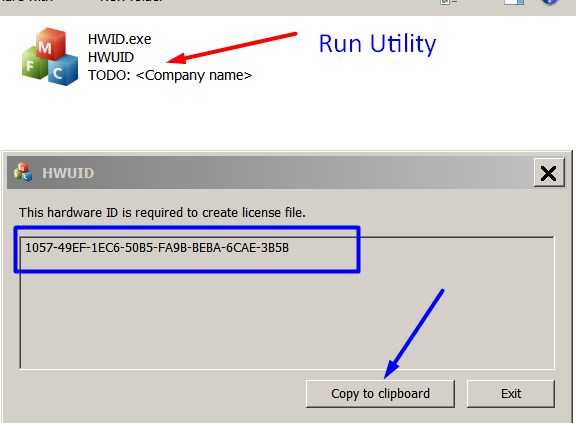
Note! You have to disable antivirus or put HWID.exe file to ignore list!
3. Put this item (License for One PC) in to your Shopping cart
4. Go to payment page and enter HardWare ID in to specified field:
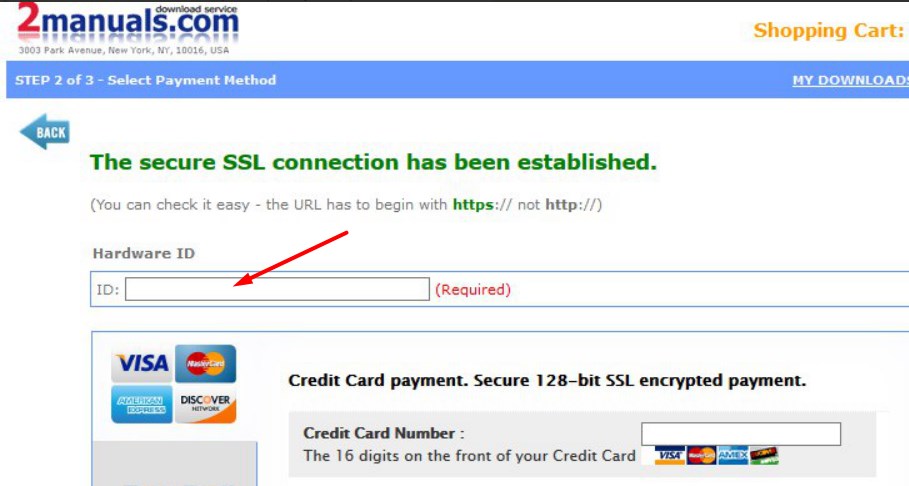
5. Make payment and You will get download link with Epson SC-T3100, SC-T3400, SC-T3450, SC-T5100, SC-T5400, SC-T5450, SC-F500, SC-F600 Adjustment Program with the License file included
6. Put Adjustment Program to Antivirus Ignore list or disable Antivirus. Then Run the program.
What next?
- Purchase License for one PC.
- You'll get download link for Epson SC-T3100, SC-T3400, SC-T3450, SC-T5100, SC-T5400, SC-T5450, SC-F500, SC-F600 Adjustment Program for ONE PC in email message immediately after your payment transaction is complete.
before using the adjustment utility.
We dont have Free Epson SC-T3100, SC-T3400, SC-T3450, SC-T5100, SC-T5400,SC-T5450, SC-F500, SC-F600 resetter.
|
|
|
|
|
Step 1
ADD TO CART |
Step 2
CHECKOUT
Select payment method. |
Step 3
Confirm the order. |
|
|
We are in business since 2002 and do our best to give our customers perfect service!
|
| vitaliy nikiforov | 2007-04-18 05:42:00 | | I just wanted to say thanks for the info from your site | |  | Le-Jaune Morgan | 2025-07-10 15:51:46 | | You saved me a ton of money. This is the second time I had to reset a printer's waste pad, and Wicreset has not disappointed me. Thank you, thank you, thank you! | | | Antony Gibbons | 2011-01-19 22:50:46 | | Usual 'Service parts inside printer' etc. message on my Epson RX640. None of the freeware solutions worked, so I was a bit dubious about this. I have to say it worked a treat!! No problems at all. It reset the waste ink counter, I cleaned the waste ink pads and so for £6.32 I've got a new printer. :-) Recommended. | | | Brent Buttorff | 2024-03-02 20:36:42 | | I was skeptical, but I paid for a key and the WIC Reset Utility program worked PERFECTLY on my Epson ET-2400. Thank you! | | | fena can | 2011-02-06 15:02:51 | | Very prompt and easy service. I did it by myself in 3 min!
You have saved me my money/ Thnx. | | | adien sari | 2007-06-23 11:20:40 | | software reseter r350 free download yang gratis ya | | | alejandro carrillo | 2009-05-08 21:22:35 | | me pueden ayudar con el reset de CX7700, CX7800
Service | | | ayyas khan | 2020-12-12 00:13:38 | | Many thanks. Your reset application allowed me to reset my Epson XP-830 to let me get a few more prints while I wait for my new printer to arrive. Great!!! | |
|





 Total customers: 437631
 Customers online: 80








