CANON PIXMA iP3600, iP4600, MP190, MP240, MP250, MP260, MP480, MP540, MP560, MP620, MP630, MP640, MP980, MP990 Service Tool work under Windows OS only.
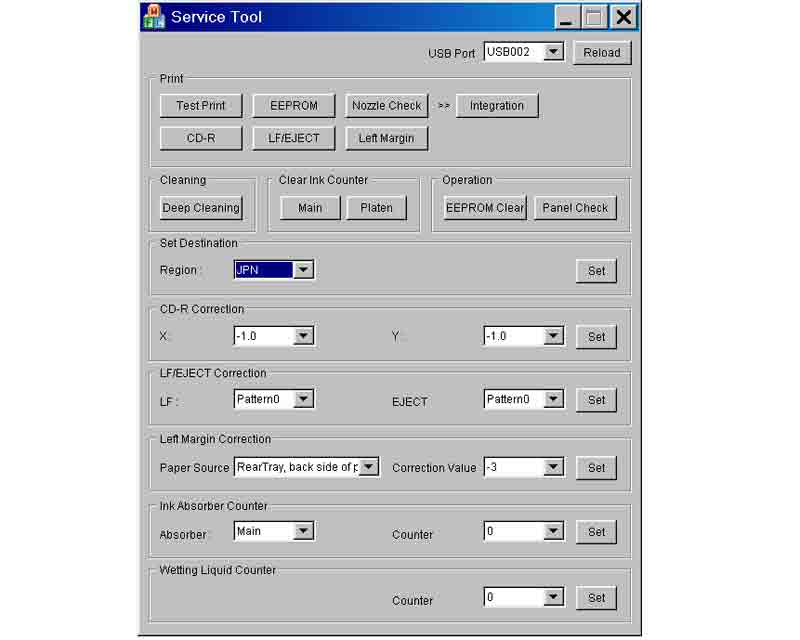
This Service Tool can make service adjustments and Reset procedures with the Ink Absorber Counter. To reset waste ink absorber counters you have to use Service Tool under Windows XP or in the compatibility mode:
1. Order and DOWNLOAD Service Tool V1050 for Canon iP3600, iP4600, MP190, MP240, MP250, MP260, MP480, MP540, MP560, MP620, MP630, MP640, MP980, MP990
2. Unzip downloaded file by WinZip.
3. Set the printer in Service Mode.
4. Run Service Utility.exe file
5. Select the connected USB port number from USB PORT
6. In the Ink Absorber Counter section of the Service Tool, select MAIN from the Absorber pull-down menu.
7. From the Counter Value(%) pull-down menu, select the value (in 10% increments) which is the closest to the actual counter value confirmed before replacement of the logic board, and click SET.
Print EEPROM information to confirm that the value is properly set to the EEPROM.
printers Service Tool for iP3600, iP4600, MP190, MP240, MP250, MP260, MP480, MP540, MP560, MP620, MP630, MP640, MP980, MP990
ZIP archive: 7 310 kB
|
|
|
|
|
Step 1
ADD TO CART |
Step 2
CHECKOUT
Select payment method. |
Step 3
Confirm the order. |
|
|
We are in business since 2002 and do our best to give our customers perfect service!
|
Our customers reviews:
| Johan de Wit | 2012-10-15 11:52:55 | | I don't believe...but real this program works perfect, can continue with printing.
Regard, from the Netherlands | | | Nicolas Carrizosa | 2009-08-27 18:29:17 | | The Epson Artisan 800FW Adjustment Program works great. Once downloaded it took me less than a minute to reset the printer. This is a very intuitive and easy to use software. I am a happy camper now.
Thanks again | |  | john nantau | 2019-10-18 23:19:41 | | Brilliant reset code worked a treat on my old XP-950 after replacing the waste ink pads. | | | Robert Rands | 2008-12-05 04:18:34 | | I got it downloaded on the page after order confirmation - Good Job!
Thank you!!
Good Service.
Art Martinez | | | Edward Gilbert | 2018-11-19 15:59:47 | | Double thanks John,
I now have a working printer. It was so quick and easy I thought it hadn't done anything, then I tried it...
Best regards,
Richard | | | MIZIKE G. | 2025-11-14 16:23:29 | | 11-14-2025 - I JUST USED THE DOWNLOADED UTLITY PROGRAM AND BOUGHT THEIR $9.99 CODE FOR PURPOSE OF RESETTING THE INK WASTE COUNTER BULLSHIT ( EPSON ET-4550 SEVERAL YEARS OLD ) WHICH I NEVER HEARD OF UNTIL LAST WEEK WHEN THE PRINTER WOULDN'T DO ANYTHING BUT TELL ME TO CONTACT EPSON. LOL- NOPE - CHAT GTP GAVE ME THE INFO FROM HERE, USED IT AND WORKED - TOOK ABOUT 5 MINUTES - ( I HOWEVER - DIDNT ACTUALLY CLEAN OR EMPTY THE INK WASTE OR WHATEVER - IM HOPING FOR THE BEST, ASSUMING ITS OLD ENOUGH THAT IT HAS DRYED ON ITS OWN. - THIS PART ISNT RECCOMENDED TO MY UNDERSTANDING - BUT ILL FIND OUT I SUPPOSE) BUT LONG STORY SHORT - EAST TO USE DOWNLOADED UTILITY, AND RESET KEY FOR 10 BUCKS WORKED - ABOUT 5 MINUTES OR LESS PROCESS. REAL SHIT - MIZIKE | | | sundar sundar | 2014-05-16 09:19:25 | | I just downloaded and tried your WIC Reset Utility.
Since I am running Windows 8.1 I was afraid that it might not work too well. I was WRONG!! Happily it works GREAT on Windows 8.1! I\'m a happy camper!!
Just thought I should let you know!!
Best regards, sundar | |
|







 Total customers: 442662
 Customers online: 147








