Epson PP-50, PP-50BD, PP-100, PP-100N, PP-100AP, PP-100II Adjustment Program
This adjustment program is developed for making PP-50, PP-50BD, PP-100, PP-100N, PP-100AP, PP-100II Disc Producer adjustments and maintenance
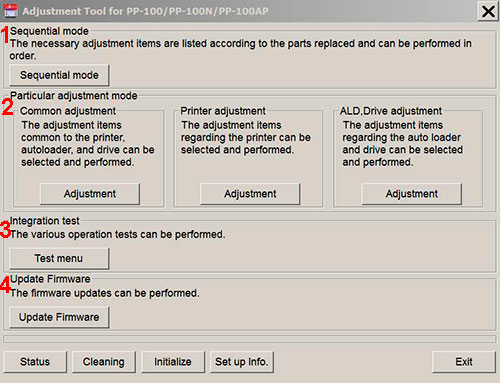
Adjustment program for Epson PP-50, PP-50BD, PP-100, PP-100N, PP-100AP, PP-100II Disc Producers has 4 main sections:
1. Sequential mode includes necessary adjustment items according to the parts replaced and can be performed in order
2. Particular adjustment mode includes 3 parts:
- Common adjustments - adjustments common to the printer, autoloader and drive.
- Printer adjustments - adjustments items regarding the printer.
- ALD, Drive adjustments - adjustments items regarding auto loader and drive.
3. Integration test - various operation tests can be performed in this section.
4. Update Firmware - the firmware updates can be performed in this section.
NOTE: Reset Drives function is NOT AVAILABLE for PP-100II model!
This adjustment program DOESN'T HAVE such functions as Waste Ink Counters Reset
If You need Waste Ink Counters reset - please use the WIC Reset Utility - Download here
Epson PP-50, PP-50BD, PP-100, PP-100N, PP-100AP, PP-100II
Adjustment Program can be used under Windows only (Millenium, 2000, XP, 7, 8, 10 Vista [in compatibility mode]).
To get this adjustment program, for the
Epson PP-50, PP-50BD, PP-100, PP-100N, PP-100AP, PP-100II
you need to do the following:
- Purchase the utility from 2manuals.com.
- You'll get download link on-line and in the email message too
Before You will use Adjustment Program we recomend You reading Service Manuals:
Epson PP-100 Service Manual
Epson PP-100AP Service Manual
Epson PP-100N Service Manual
You can download Free DEMO version first. This DEMO PP-50, PP-50BD, PP-100, PP-100N, PP-100AP, PP-100II Adjustment Program is developed special for our customers. You can download it and use - Free. You can see all available adjustment functions in Original PP-50, PP-50BD, PP-100, PP-100N, PP-100AP, PP-100II Adjustment program and be sure before purchasing this Adjustment program.
Download Epson PP-100, PP-100N, PP-100AP, PP-100II DEMO Adjustment Program Free - Download Free
Video Tutorial how to work with DEMO Epson PP-50, PP-50BD, PP-100, PP-100N, PP-100AP, PP-100II Adjustemnt Program:
Please contact us if you have not received your order.
We don't supply Free Epson PP-50, PP-50BD, PP-100, PP-100N, PP-100AP, PP-100II Resetter
|
|
|
|
|
Step 1
ADD TO CART |
Step 2
CHECKOUT
Select payment method. |
Step 3
Confirm the order. |
|
|
We are in business since 2002 and do our best to give our customers perfect service!
|
| Spike Grimme | 2020-07-23 12:47:07 | | Oh my golly, I didn't think that would work, but it fixed it in about 30 seconds. Even though I hadn't been able to disable the process monitor thing that it says do first, the reset program still worked instantly when I ran it on an Epson XP-540. If there is one thing that gets my goat in terms of being so unethical both a rip-off financially and environmentally unsustainable, its the way printer companies rip us off. So am super grateful to have found a way round this. For a much more reasonable price than the printer shop told us, and something I could do at home when I needed the printer urgently for work! Thanks so much! | |  | claudia wehnes | 2018-01-05 15:35:36 | | Heel erg blij. Very happy that my epson XP510 is alive again. Thank you from the Netherlands. | | | Julius Gee | 2004-06-23 19:41:01 | | Excellent! I had an old 51 sitting around but no way to find out what was wrong. the error codes(blinks) are worth the 7bills I paid. | | | vitaliy nikiforov | 2007-04-18 05:42:00 | | I just wanted to say thanks for the info from your site | | | NACHO GOMEZ | 2010-10-25 23:44:48 | I got the flashing lights and Service required message on my Epson R2400, as many others have before!
I spent hours online and eventually managed to download Epsons own
Adjustment Program. It showed me the waste ink settings but would not let me reset the counter, although I had disconnected the feed tubes and re-routed them to an external bottle.
Today I found 2Manuals.com and downloaded their WIC reset program. I thought It probably won\'t work but one key is only $9.99 so what the heck!
Well that was the best $9.99 I have ever spent - as soon as I entered the key and hit RESET the printer whirred into action, ink pumped into my waste bottle and I am back in action!
This has saved me a lot of money and the hassle of sending the printer to an Epson service centre. Truly a 5***** product! Chris Porteous, Prestatyn, U.K. | |
|





 Total customers: 434087
 Customers online: 101








